



How to Build a Web Crawler from Scratch in 2026?
Most guides on web crawlers start with a definition. This one starts with a problem.
You want data from the web. Prices, listings, job postings, product details, competitor content. You could visit those pages manually, or you could build something that does it for you at scale, on a schedule, in a format your team can actually use.
That something is a web crawler. Building one is genuinely not that hard. Keeping it running when sites change layouts, managing access rules that shift by region, scaling it without burning infrastructure budget, and knowing when to stop doing it yourself is where most teams hit a wall.
This guide covers all of it. You will learn how a web crawler works mechanically, how to build one in Python without overengineering it, which stack fits which goal, where first builds commonly break down, and what has changed about the crawling environment in 2026 that every developer should understand before writing a single line of code.
What Is a Web Crawler and Why Do Businesses Build Them
A web crawler is an automated program that visits web pages, reads their content, follows links to new pages, and repeats. Search engines use them to keep their index fresh. Businesses use them for something more targeted: collecting structured data from sources they do not own or control.
According to the F5 Labs 2026 Advanced Persistent Bot Report, scraper traffic now accounts for 10.2% of all global web traffic even after bot-mitigation systems are applied. In sectors like fashion (53%), hospitality (49%), and healthcare (34%), automated data collection is not occasional activity. It is a constant competitive force shaping pricing, availability, and market intelligence in real time.
That context matters if you are building your own crawler. You are entering a space where websites actively defend against automation, where compliance requirements are tightening, and where the difference between a crawler that works in January and one that still works in June often comes down to how well it was designed from the start.
The most common use cases that justify building a custom web crawler include price and availability tracking, content aggregation, SEO site auditing, job and real estate feed creation, lead discovery, and training data collection for machine learning models.
If you want to see how those use cases play out with real property data, the guide on Scraping Home.com: What to Collect and How to Use It walks through a detailed field-by-field example that covers most of these patterns.
Stop building crawler infrastructure and start using the data it was supposed to deliver.
• No contracts. • No credit card required. • No scraping infrastructure to maintain.
How a Web Crawler Works: The Core Loop
Strip away every framework and advanced feature and a web crawler is a loop with a to-visit list. Understanding that loop is the foundation for every design decision you make when building one.
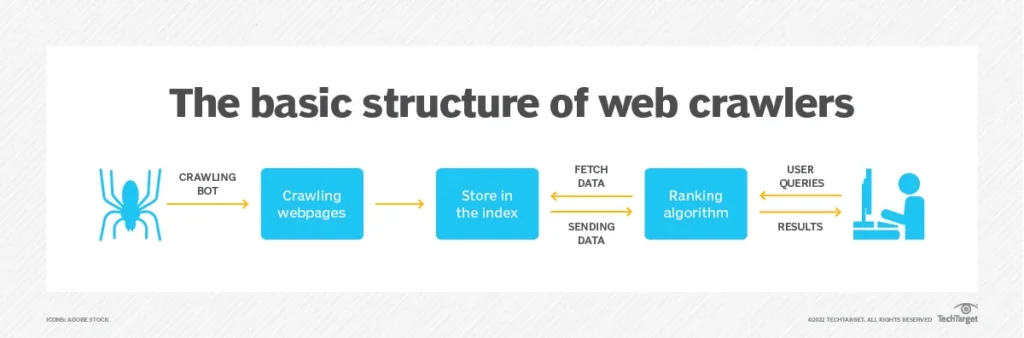
Step 1: Seeds
Start with one or more seed URLs. These are your entry points into the site. Choose pages that link to the content you care about rather than just the homepage. A category page or a sitemap is almost always a better seed than the homepage.
Step 2: Fetch
Make an HTTP GET request for each URL. Handle redirects gracefully. Log the status code alongside the content so you can filter 404s, 429s, and server errors downstream rather than treating them as valid records.
Step 3: Parse
Read the HTML. Extract the fields you need using CSS selectors or XPath. For most projects that means a product name, price, date, description, or URL. Pick one selector strategy and stay consistent across the codebase.
Step 4: Extract Links
Pull all anchor tags from the page. Normalize them to absolute URLs. Filter out external domains, media file extensions, and URL patterns that point to content you do not want. What remains goes into the queue.
Step 5: Deduplicate
Before adding any URL to the queue, check whether you have already visited it or already queued it. A visited set in memory handles this at small scale. At larger scale, use a persistent store. Without deduplication, a site with circular navigation can run your crawler indefinitely on the same pages.
Step 6: Respect Crawl Rules
Check robots.txt before crawling any new domain. Add a delay between requests. Cap concurrent connections per host. These are not optional courtesies. Sites that detect abusive patterns block the IP, ban the user-agent, or route the crawler to honeypot content that silently poisons your dataset.
Step 7: Store
Save each record in a structured format. Start with JSON lines, one object per line. Move to a relational database when you need to query, join, or deduplicate records across time.
Step 8: Repeat
Pop the next URL from the queue and begin again. Set a hard page limit or a depth limit so the crawl terminates at a known point rather than running until you manually stop it.
That is the entire loop. Every framework, proxy layer, and retry strategy you will ever add is built around this eight-step cycle. The complexity comes in making it fast, reliable, and observable, not in the logic itself.
Need This at Enterprise Scale?
While building your own crawler works for focused, lower-volume use cases, crawling across multiple domains with uptime guarantees, compliance requirements, and consistent data quality introduces overhead most engineering teams underestimate until the second rebuild.
How to Build a Web Crawler in Python: A Practical Starting Point
Python is the right language for a first web crawler. The libraries handle the heavy lifting, the syntax is readable, and the community has already solved most of the problems you will run into.
What You Need
- Python 3.8 or higher
- Requests library for HTTP
- BeautifulSoup4 for HTML parsing
- A SQLite database or JSON lines file for storage
The Basic Structure
Build three functions first. A fetch function that takes a URL and returns the HTML string or None on failure. A parse function that takes HTML and returns a dictionary of the fields you care about. A links function that takes HTML and a base URL and returns a normalized list of absolute URLs to follow.
Then build the loop. Initialize a queue as a list and a visited set as empty. Pop from the queue, fetch, parse, extract links, push new URLs into the queue, sleep briefly, and repeat. That is the entire working structure of a minimal crawler.
Keep the three functions separate from the loop logic. When a site changes its HTML structure, you change the parse function only. When you want to add concurrency, you replace the loop. Separation makes the whole system easier to test and maintain.
Good Habits from Day One
- Set a descriptive User-Agent string that identifies your crawler. Anonymous crawlers get blocked faster and give you no recourse if a site administrator wants to reach you.
- Parse robots.txt before starting. Python’s urllib.robotparser module handles this in two lines and saves you from crawling disallowed paths that could get the crawler blacklisted.
- Use a random delay between 1 and 3 seconds rather than a fixed interval. Fixed delays are easier for anti-bot systems to fingerprint as automation.
- Log every fetch with a timestamp, URL, HTTP status code, and record count. This log is the first thing you check when something breaks.
- Validate required fields before writing a record. A price field returning None written to your dataset is far worse than a skipped record. Silent bad data corrupts everything downstream.
- Store a content hash alongside each record from day one. You will need it the moment you add change detection to the crawl.
For a detailed comparison of what the Python ecosystem offers as your crawl grows beyond the basics, the Scraper Tool vs Managed Service: How to Choose guide lays out build-versus-buy benchmarks with real infrastructure cost estimates at different scale points.
Choosing the Right Stack for Your Web Crawler
There is no universal stack. The right choice depends on the volume of pages you need, whether target sites require JavaScript rendering, how much engineering time you can invest in plumbing, and how fast you need results. Here is a clear decision framework.
Requests + BeautifulSoup
Use this for learning, prototypes, and crawls under roughly five thousand pages. It requires no configuration overhead, the code is easy to read and debug, and onboarding a new engineer takes minutes rather than hours. The hard limit is JavaScript: any content loaded dynamically after the page renders is invisible to a Requests-based crawler.
Scrapy
Scrapy is a full crawling framework that handles concurrency, request queuing, automatic retries, deduplication, and export pipelines out of the box. For any crawl running into tens of thousands of pages, writing that plumbing from scratch wastes time that Scrapy has already invested. The learning curve is real but repays quickly. The middleware system makes it straightforward to add proxies, custom headers, and rate limiting without touching the core spider logic.
Playwright or Puppeteer
Use a headless browser only when the content you need is loaded by JavaScript after the initial page render. It runs three to five times slower than a plain HTTP request and carries significantly more infrastructure overhead. The decision should be binary: if the data is in the initial HTML response, use Requests. If it loads after a script executes, Playwright is the right tool.
A common and expensive mistake is reaching for Playwright by default because a site feels complex. Check the actual page source first. A surprising share of sites that look dynamic in the browser serve their core structured data in the initial HTML before any JavaScript runs.
Storage by Stage
JSON lines for a first build. SQLite when you need to run queries. PostgreSQL when multiple teams or downstream systems need reliable access. A cloud data warehouse when analytics teams need to join crawler output with other data sources. Do not over-engineer storage on the first version.
Scheduling
A cron job handles a single crawler on a predictable schedule. Graduate to a proper workflow orchestration tool when you have multiple crawlers with dependencies, need alerting on failure, or require retry logic that persists across process restarts.
Respectful Crawling: The Rules That Protect Your Project
Responsible crawling is not just an ethical stance. It is a practical one. Crawlers that ignore access rules get blocked, get flagged, and in some jurisdictions, expose their operators to legal liability.
Robots.txt Has Evolved Beyond a Suggestion
Robots.txt started as a polite industry convention. In 2026, it is becoming part of a structured permission framework with real enforcement teeth. Cloudflare now blocks AI crawlers by default. Platforms like TollBit have built licensing marketplaces for data access. The F5 Labs 2026 report describes this as the beginning of a permission economy where data access is negotiated rather than assumed.
The practical implication for any crawl operator is straightforward. Disallowed paths are hard boundaries, not suggestions. Sites that detect violations route the crawler to honeypot URLs or serve deliberately degraded data without signaling the error. You end up with a dataset that looks complete but is not.
Rate Limits and Concurrency
One request per second per domain is a safe default. On smaller sites, slow down further. Keep concurrent connections to a single host at two or fewer. The goal is to stay below the detection threshold of the site’s anti-bot layer, not just to avoid overloading the server. A crawler that gets blocked returns nothing. One that runs slightly slower returns everything.
Data Scope and Documentation
Collect only what you need. If a page contains user-generated personal information that is not part of your extraction target, skip it entirely. Maintain a short internal README that documents what you collect, from which sources, at what frequency, and how long you retain each record. That documentation becomes essential the first time the crawl is reviewed by legal, compliance, or an external auditor.
Handling Version Drift
Sites change their layouts, rename CSS classes, and restructure navigation without notifying anyone. When a field returns empty, log it immediately but do not write the empty record to the dataset as if it were valid. A dataset with silent failures is more dangerous than one that raises a clear alert. Build field-level validation into the pipeline from the first version, not as a later improvement.
Scaling a Web Crawler: Patterns That Hold Up
A crawler handling one site at a thousand pages is a fundamentally different engineering problem from one handling fifty sites at a million pages each. These patterns separate crawlers that scale from ones that require rewrites at every new order of magnitude.
Replace the In-Memory Queue
An in-memory queue works on a single machine with modest volume. As soon as the crawl spans multiple processes or machines, move to a proper message queue. This smooths throughput under variable fetch times, survives process restarts, and prevents the pipeline from stalling when slow or rate-limiting hosts create backlogs.
Retry Logic with Backoff
Network failures are predictable. Transient errors on status 429 (rate limited), 503 (service unavailable), and connection timeouts should trigger an automatic retry with exponential backoff. Cap retries at three attempts per URL. Log permanent failures in a separate table so you can audit them without wading through expected retry noise.
Content Hashing for Change Detection
Store a hash of each fetched page alongside the extracted data. On every subsequent crawl, compute the hash of the new response before parsing it. If the hash matches the stored value, skip the write entirely. At any real scale, the majority of pages have not changed since the last crawl. Skipping unchanged content reduces storage, cuts processing time downstream, and keeps the output dataset clean.
The 2026 State of Web Scraping report describes a clear industry shift from scheduled batch crawls to event-driven architectures. Instead of crawling everything on a timer, mature systems crawl in response to evidence that something has changed. A competitor price monitor that runs on everything every hour is far less efficient than one that responds to change signals and fetches only what is actually different.
Observability From Day One
Track records extracted per minute, error rate broken down by domain, and average fetch time per host. A drop in record count without a corresponding spike in errors is a silent failure: the site has changed its HTML structure and your selectors are returning empty without raising any exception. You want to catch that pattern within hours, not discover it two weeks later when a stakeholder asks why the data looks thin.
For a detailed look at when a targeted crawl outperforms a broad one on both quality and cost, Scrape Google or Go Targeted: Picking the Right Strategy works through the specific scenarios where a narrower crawl architecture consistently produces better data quality at lower infrastructure cost.
Web Crawling vs Web Scraping: The Distinction That Matters
The two terms get used interchangeably. That causes real problems when teams try to scope a data project and end up underbuilding the discovery layer or overbuilding the extraction layer.
Web crawling is discovering and visiting pages at scale by following links. The goal is breadth and navigation.
Web scraping is extracting specific structured fields from specific pages. The goal is data precision.
Most real projects need both. You crawl to discover which pages contain the records you are after, then you scrape to pull the exact fields from each of those pages. They are distinct engineering problems that benefit from separate design even when they run in the same pipeline.
Treating them as one thing leads to architectures that mix navigation logic with extraction logic. When either the site’s structure or your target fields change, you cannot isolate the fix. Keeping them separate means a site layout change only affects the crawl layer, and a field rename only affects the scrape layer.
For a practical example of how this separation shapes a competitive pricing data strategy in the travel sector, Expedia Listings and Competitor Pricing Strategy walks through a crawl-then-scrape pipeline from discovery to structured output.
When to Build Your Own Crawler and When to Stop
This section is the one most guides skip. Building a web crawler is the easy part of the decision. Maintaining it across sites that change layouts quarterly, compliance requirements that vary by region, and data volume that grows faster than engineering headcount is where the real cost lives.
Build Your Own When
- You are targeting a small, stable set of sites that rarely change their HTML structure
- Your data needs are specific enough that generic tools do not produce the right output format or field structure
- You have dedicated engineering time for ongoing maintenance, monitoring, and selector updates, not just the initial build
- Your use case does not require geographic IP routing, advanced anti-bot handling, or JavaScript rendering at scale
Consider a Managed Solution When
- Coverage needs span more than twenty domains with varying structures and anti-bot defenses
- Freshness guarantees matter and downtime has a direct cost in terms of stale pricing, missed leads, or broken data feeds
- Compliance documentation, data lineage, and audit trails are requirements rather than nice-to-haves
- Engineering time spent on crawler maintenance is actively competing with time available for the product or analysis the data is meant to support
Most teams underestimate the ongoing maintenance cost of the infrastructure they build. A crawler that works reliably on ten sites requires roughly ten times the maintenance of one that targets a single domain. When site count crosses twenty, the engineering investment in keeping crawlers alive begins to compete directly with roadmap work.
That is not an argument against building. It is an argument for being clear-eyed about what the build decision commits you to over the next twelve months, not just the first sprint.
How PromptCloud Handles Web Crawling at Enterprise Scale
PromptCloud is a managed web data extraction platform that has been running large-scale crawling infrastructure for over a decade. The platform is designed for organizations that need reliable, structured, and compliance-ready data feeds without building or maintaining the underlying crawling infrastructure themselves.
What PromptCloud Provides
- Custom crawlers built and maintained for specific target domains, with automatic updates when site structures change
- Structured data delivery in client-specified schemas with field-level validation and quality monitoring
- Support for JavaScript-heavy sites, login-gated content, and geographically restricted sources using rotating residential proxies
- Change detection and event-driven crawling for use cases that require near-real-time updates rather than scheduled batch runs
- Compliance documentation covering data provenance, collection scope, retention policy, and robots.txt adherence for each data source
Who Uses It
PromptCloud serves e-commerce teams monitoring competitor pricing and product availability, financial services firms tracking alternative data signals, travel platforms aggregating fare and availability data across hundreds of sources, and enterprises building training datasets for machine learning pipelines. The common thread is data volume and reliability requirements that would consume more engineering time than the team can justify.
When It Makes Sense Over Building
If your organization needs data from more than twenty sources, operates under compliance requirements that include data lineage and audit documentation, or has experienced the engineering cost of maintaining crawlers through multiple site redesigns, a managed pipeline eliminates that maintenance burden entirely. Your team receives structured, validated data on a schedule or in real time without owning any of the infrastructure that produces it.
To see how a managed crawling pipeline handles a specific high-complexity vertical, the Expedia Listings and Competitor Pricing Strategy case walks through how travel pricing data is collected, structured, and delivered at scale.
The Short Version
A web crawler is a fetch-parse-store loop with deduplication and politeness controls. Building a working version in Python takes a weekend. The craft is in validation, observability, and designing for the day the target site changes its structure without warning.
Start with Requests and BeautifulSoup. Move to Scrapy when you need concurrency and structure. Add Playwright only when JavaScript rendering is genuinely required, not because a site looks complex. Monitor from day one, not after something breaks.
If the project grows past a handful of sites or needs freshness guarantees and compliance coverage, weigh the engineering cost of maintaining the infrastructure against what a managed pipeline would free your team to build instead. The data is not the hard part. What you do with it is.
Stop writing crawlers. Start using the data.
• No contracts. • No credit card required. • No scraping infrastructure to maintain.
Frequently Asked Questions
What is the difference between a web crawler and a web scraper?
A web crawler discovers and visits pages by following links across a site or across the web. A web scraper extracts specific structured fields from specific pages. Most production data projects use both: the crawler identifies which pages contain the relevant records, and the scraper pulls the exact fields from each of those pages. They are distinct engineering layers, and mixing them in a single codebase makes both harder to maintain.
How long does it take to build a web crawler from scratch?
A basic functional crawler in Python can be built in one to two days. A production-ready crawler with retry logic, deduplication, validation, scheduling, and monitoring typically takes two to four weeks of engineering time. Ongoing maintenance across sites that change their layouts adds a recurring time cost that most teams underestimate at the start.
Is it legal to crawl websites?
Crawling publicly accessible web content is generally legal in most jurisdictions, but the rules vary and are still evolving. Key risk factors include bypassing authentication systems, ignoring robots.txt directives, scraping personal data without a lawful basis under GDPR or CCPA, and violating a site’s terms of service. The hiQ vs. LinkedIn case established that scraping publicly available data does not violate the Computer Fraud and Abuse Act in the United States, but terms of service violations remain a civil risk. Any commercial crawling operation should have legal review and documented data practices before it goes live.
How do I stop my web crawler from getting blocked?
Respect robots.txt and crawl-delay directives. Set a descriptive User-Agent string that identifies your crawler. Use a random delay between requests rather than a fixed interval. Limit concurrent connections per host to two or fewer. Rotate IP addresses if you are crawling at high volume. Avoid crawling during peak traffic hours for the target site. The goal is to look like a low-traffic visitor rather than an automated system. Crawlers that mimic browser behavior with realistic timing are significantly harder for anti-bot systems to detect.
What Python libraries are best for building a web crawler?
For simple crawls and prototypes, Requests combined with BeautifulSoup4 is the standard starting point. For high-volume or multi-domain crawls that need concurrency, automatic retries, and pipeline exports, Scrapy is the most mature and well-documented framework available. For JavaScript-heavy sites where content loads dynamically after the page renders, Playwright is the current best option, with Puppeteer as a Node.js alternative. The choice depends on volume, JavaScript requirements, and how much configuration overhead your team is willing to manage.
How do I crawl JavaScript-rendered websites?
Use a headless browser like Playwright or Puppeteer. These tools launch a real browser engine in the background, execute all page scripts, wait for the DOM to fully populate, and then return the rendered HTML for parsing. Before defaulting to this approach, check the page source directly. Many sites that appear dynamic in the browser serve their core structured data in the initial HTML before JavaScript runs. A Requests-based fetch is three to five times faster and far cheaper on infrastructure, so it is worth confirming you actually need a headless browser before adding that complexity.
What is robots.txt and do I have to follow it?
Robots.txt is a file hosted at the root of a website that specifies which paths crawlers are permitted or not permitted to access, and can also include a crawl-delay directive to limit request frequency. Following it is not legally required in most jurisdictions, but ignoring it creates legal and ethical risk, and practically speaking, sites that detect robots.txt violations often serve honeypot content or block the crawler’s IP entirely. In 2026, many platforms including Cloudflare enforce crawler restrictions by default, making compliance increasingly important from a purely technical perspective.
How do I handle pagination when crawling a website?
The most reliable method is to identify the pagination pattern in the URL structure and generate the page URLs directly rather than relying on next-page links. When URLs follow a predictable pattern like page=1, page=2, this is straightforward. When pagination is controlled by JavaScript or requires session state, a headless browser is necessary. Always add a check for duplicate URLs regardless of the method, because some sites recycle page numbers or serve the same content under multiple paths.
How often should I run my web crawler?
Crawl frequency should match the rate at which the target data changes, not a fixed schedule you chose arbitrarily. Product pricing on a retail site may change several times a day, making hourly crawls reasonable. A directory of business listings that updates weekly does not justify daily crawling. Overcrawling wastes infrastructure and increases the risk of triggering rate limits or IP bans. Undercrawling means your dataset goes stale between runs. The best practice is to start with change detection: store a content hash, and only re-fetch and re-parse pages where the hash has changed since the last crawl.
When should I use a managed web crawling service instead of building my own?
When the number of target domains exceeds twenty, when uptime and freshness guarantees carry a direct business cost, when compliance documentation is a requirement rather than a best practice, or when the engineering hours spent maintaining selectors and handling site changes are competing with higher-priority product work. Building your own crawler is the right call for focused, stable, lower-volume use cases where you need full control over the extraction logic. A managed service makes sense when the infrastructure overhead exceeds the value of owning it.