



**TL;DR**
Scraping WordPress isn’t as easy as it looks. Different themes, plugins, and APIs change how data loads. One site might serve clean JSON via /wp-json/, while another hides its post body behind a JavaScript renderer or infinite scroll.
This article walks through how an automated WordPress scraper handles these variations. You’ll learn how to identify blog structures, parse metadata, extract content cleanly, manage pagination, and validate the output for real analysis. No frameworks pushed, no sales pitch; just a practical guide to extracting WordPress blog data efficiently, ethically, and at scale.What you’ll learn:
Why WordPress Scraping Still Matters
WordPress isn’t new, but it’s still the default fabric of the web. Currently, 43% of all websites plus more than 60 million blogs use WP as of 2025. That includes personal creators, news portals, legacy websites, news wires, corporates, SaaS content hubs, and thousands of industry publishers.
From a data collection standpoint, that makes WordPress a predictable, structured target. Titles, authors, timestamps, tags, and content blocks follow a schema that, while customized by themes, share the same foundation.
Yet, that uniformity hides complexity. Every plugin—from SEO tools to comment managers—adds a twist to the HTML or API structure. It’s about reconstructing meaning from structure; extracting who said what, when, under which category, and how readers reacted.
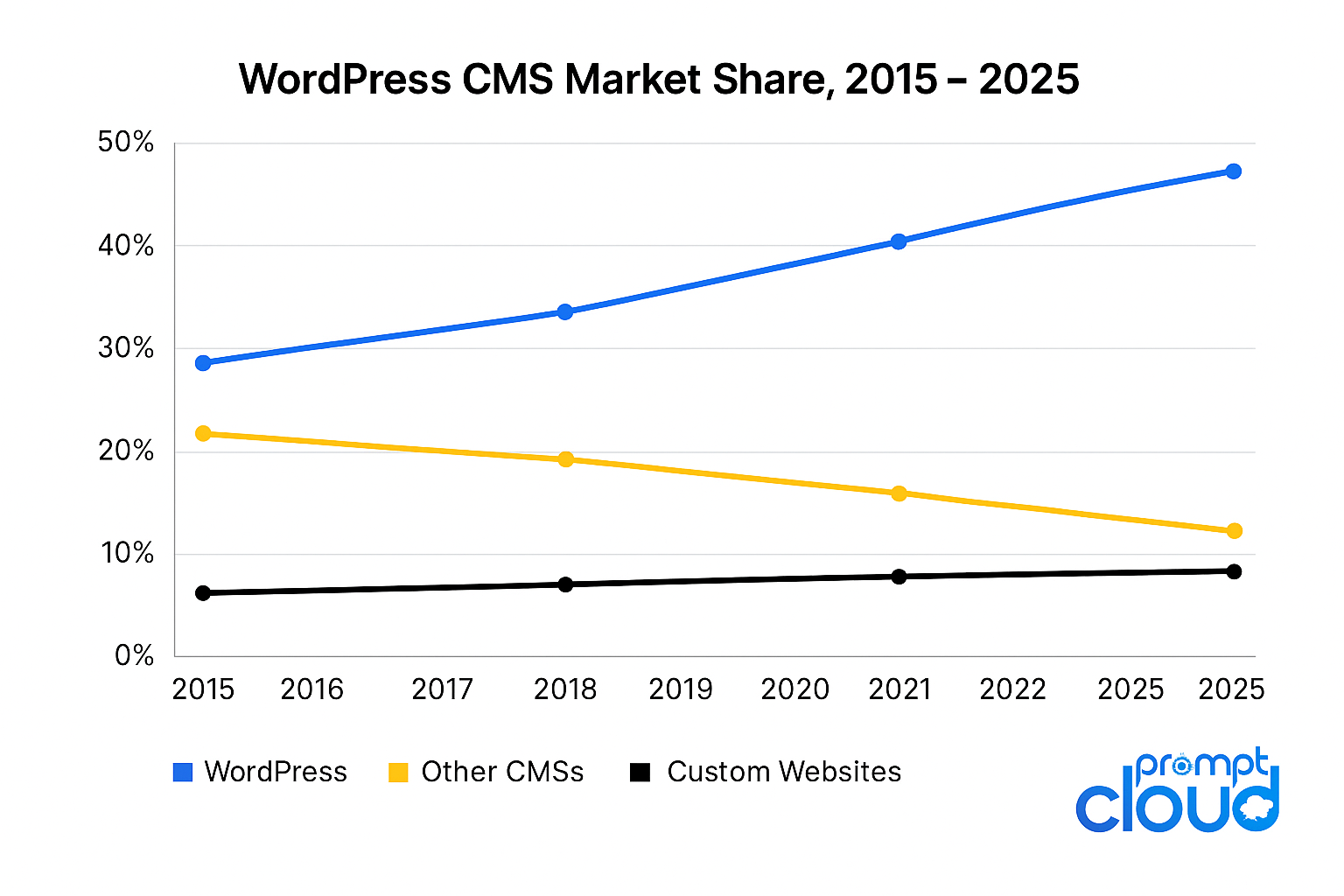
Figure 1 – WordPress CMS Market Share, 2015–2025.
Source: W3Techs, 2025
Understanding the WordPress Architecture
- Database (MySQL/PostgreSQL): stores posts, metadata, users, and taxonomies.
- PHP Backend: generates HTML or JSON from database queries.
- Front-End Templates: render data through themes and widgets.
For scraping, only the front-end and API matter. That’s where published content becomes accessible.
Most modern WordPress sites offer two access points:
- 1. HTML layer (through page URLs like /2025/10/top-ai-tools/)
- 2. REST API layer (/wp-json/wp/v2/posts/)
| Method | Pros | Cons |
| REST API | Clean JSON, no parsing | May be disabled, limited fields |
| HTML Parsing | Works everywhere | Requires structure detection, higher noise |
Don’t just read about large-scale WordPress scraping
How a WordPress Scraper Reads a Page
Let’s break down how automated WordPress scrapers actually “read” a site.
- Site Discovery
Start with a seed URL—say, https://exampleblog.com. The scraper checks the sitemap (/sitemap.xml) or RSS feed (/feed/) to identify recent posts. - Pattern Detection
ML / rule-based recognition identifies recurring HTML structures. For example, div classes like .post-title, .entry-content, etc. - Field Mapping
Each element (title, author, timestamp, tag) is assigned to a schema. The scraper learns these patterns across multiple posts before extraction begins. - Pagination Handling
Some sites use traditional “Page 2” URLs, others rely on lazy loading or infinite scroll. The scraper detects pagination links dynamically or triggers simulated scrolling using a headless browser. - Data Extraction
HTML elements or JSON fields are extracted into structured formats—usually JSON or CSV. Encoding, special characters, and line breaks are cleaned here.
How to work with the WordPress REST API
This is the fastest route if the site allows it. Every WordPress installation running version 4.7+ exposes endpoints like:
/wp-json/wp/v2/posts
/wp-json/wp/v2/categories
/wp-json/wp/v2/tags
/wp-json/wp/v2/comments
Each endpoint returns structured JSON. A single post object might include:
- title.rendered
- content.rendered
- date_gmt
- categories
- tags
- author
- excerpt
- featured_media
Pagination is handled through query parameters:
?per_page=100&page=2
If you’re building your own extractor, check rate limits with a small test crawl first—never hammer the endpoint.
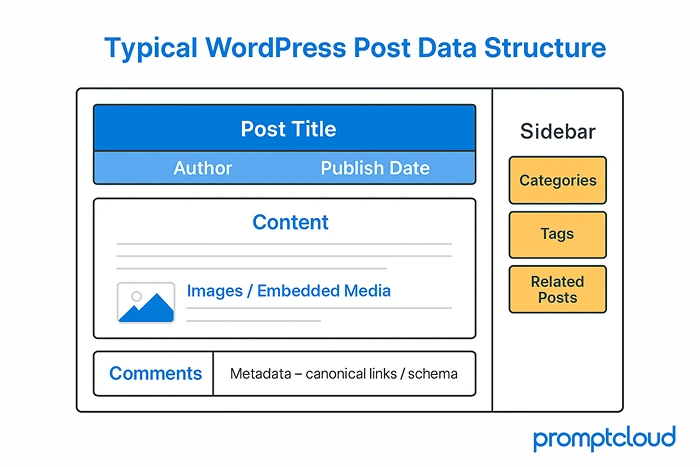
Figure 2 – Core data fields extracted from a typical WordPress post — title, metadata, content, and engagement signals.
When the API Is Blocked: HTML Parsing and Content Rendering
Here’s where traditional scraping techniques come back into play.
Many publishers restrict their API or obfuscate endpoints for security. But their pages are still public. That’s where content parsing steps in.
The HTML Workflow
- Request Handling: Send GET requests with randomized headers and user agents to mimic browsers.
- DOM Parsing: Load the HTML into parsers like BeautifulSoup or Cheerio.
- XPath or CSS Extraction: Identify containers by class patterns (div.entry-content, h1.post-title).
- Cleanup: Strip navigation, ads, and unrelated sections.
- Normalization: Save fields to a clean JSON structure.
Modern sites load post bodies dynamically via JavaScript. That’s where headless browsers; Playwright or Puppeteer help. They render full pages before extraction, allowing access to dynamic comments or embedded media. It’s slower but essential for accuracy on interactive blogs.
Handling Media + Comments and Metadata
1. Media Extraction
Featured images, embedded videos, and galleries often reveal engagement patterns. Scrapers collect:
- og:image and <img> tags for thumbnails
- srcset for responsive images
- iframe URLs for videos (YouTube, Vimeo)
- Alt text for accessibility indexing
2. Comment Threads
WordPress comments are stored separately, often loaded asynchronously. A scraper identifies the comment API (e.g., /wp-json/wp/v2/comments?post=ID) or parses HTML comment sections. Each comment carries metadata:
- Author name
- Date/time
- Content text
- Reply depth
- User ID (if public)
3. Post Metadata
Metadata fields include meta name=”description”, canonical URLs, Open Graph tags, and Schema.org data. These enrich analytics for SEO, engagement, and authorship insights.
Dealing with Authentication and Restricted Data
While most blogs are public, some restrict content behind light paywalls or membership plugins like MemberPress or WP-Members.
Options:
- Cookie-based sessions: emulate user login flow (if permitted).
- API Tokens: if the site provides a public developer key.
- Headless Browser Authentication: automate login once, maintain session cookies.
For ethical reasons, avoid bypassing security measures. Focus on publicly accessible data that’s indexed by search engines.
Managing Scale and Rate Limiting
One blog is easy to scrape. Hundreds require orchestration. Large-scale crawlers use request queues, proxy rotation, and rate throttling to avoid overload or bans. Example setup:
- Request scheduler: processes batches of 10–20 concurrent requests.
- Delay randomization: inserts 2–6 seconds between fetches.
- Proxy pool: rotates IPs from multiple geographies.
These controls prevent detection and ensure responsible scraping. For efficiency, store page fingerprints (hashes of title+URL) to detect and skip unchanged content during incremental crawls.
Normalizing and Structuring the Output
Once extracted, WordPress data can be chaotic—HTML tags, shortcodes, custom blocks, embedded widgets. Normalization is what makes it usable downstream.
Core normalization tasks:
- Strip HTML noise while preserving text hierarchy (H1, H2, P).
- Standardize timestamps to UTC or ISO format.
- De-duplicate posts that are based on canonical URL / slug.
- Map taxonomies (e.g., merge “AI” w/ “Artificial Intelligence”).
- Extract entities (people, products, brands) with NLP libraries.
Ensuring Data Quality Plus Freshness
To maintain freshness:
- Use incremental crawls. Fetch only new posts after the latest stored date.
- Revalidate metadata weekly. Titles, descriptions, and categories may shift.
- Track status codes. A 404 signals a deleted post; archive accordingly.
- Run automated validation. Check for missing fields or mismatched types, then route failures through data validation frameworks that enforce schema rules and freshness thresholds.
Ethical and Legal Considerations
- Follow robots.txt: Always check disallowed paths.
- Respect site load: Throttle request rates to avoid impacting performance.
- Cite and attribute: When using excerpts publicly, credit original publishers.
- Don’t store personal user data: Skip email addresses or sensitive info.
- Stay transparent: If using scraped data commercially, review Terms of Service.
Multilingual and Taxonomy Scraping
A robust scraper identifies language codes automatically and assigns language tags in output.
Category & Tag Extraction:
Taxonomies (categories, tags, topics) are gold for clustering posts. The API endpoint /wp-json/wp/v2/categories provides IDs and names; the scraper joins them with post IDs for contextual grouping. This enables analysis like:
- Top 10 trending topics in automotive blogs last quarter
- Average word count per category
- Most referenced keywords per niche
Scraping for Machine Learning and NLP
WordPress blogs are a treasure trove for text-based AI models. They provide diverse writing styles, topical variety, and labeled data (through tags or categories). Common ML use cases:
- Sentiment Analysis: training models on reviews / opinionated posts.
- Topic Modeling: clustering thousands of articles / content into themes.
- Named Entity Recognition: identifying brands / locations / people.
- Summarization: creating concise briefs from long-form/short-from posts.
Since most blogs are semi-structured, they require less cleaning than random web text, making them ideal for language model fine-tuning. It’s the same datafication principles at work: converting messy, human text into structured, machine-ready signals for downstream models.
How to Troubleshoot Some Common Issues?
| Problem | Root Cause | Solution |
| Blank content | JavaScript rendering required | Switch to headless browser |
| Duplicated entries | Multiple category pages | Use canonical URLs as keys |
| Encoding errors | Mixed UTF-8/Latin-1 content | Normalize encoding to UTF-8 |
| Broken pagination | Infinite scroll without next link | Trigger scroll events programmatically |
| Missing fields | Plugin conflicts | Fallback to API or alternate selectors |
| Inconsistent timestamps | Localized formats | Parse and convert via dateutils |
Small corrections like these save hours in post-processing later.
How to Crawl WordPress Blogs with PromptCloud’s Automated WordPress Scraper
Scraping WordPress at scale used to feel like plumbing work, endless selector tweaks, broken pagers, surprise theme changes. The automated WordPress scraper from PromptCloud sidesteps all that. It understands how WordPress presents content, then adjusts itself when the presentation shifts. You set the scope, it does the legwork.
1) Point it at your sources
Feed the system a list of WordPress domains or category URLs. It tests what is live, maps sitemaps and feeds, and checks whether the REST endpoints are open, for example /wp-json/wp/v2/posts/. From that first scan it picks the fastest route, JSON when available, HTML rendering when not. No template wiring, no brittle rules.
2) Let it read the page like an engineer
Themes differ, the underlying anatomy does not. The scraper uses trained models to spot the usual suspects, title, author, publish time, categories, tags, excerpts, comments, featured media. Rather than chasing class names, it relies on structural and visual cues. If a site installs a new theme or plugin, the model performs a fresh pass and re-identifies fields on the next run.
3) Crawl with care, at the right pace
Scale should not punish the origin site. The crawler spaces requests, rotates IPs, and watches response codes as it goes. It respects robots.txt and applies separate schedules, daily for newsy blogs, weekly for long-form libraries. The result is steady capture without rate spikes or noisy retries.
4) Pull the whole story, not just the text
Beyond the body copy, the scraper collects dates, canonical URLs, open graph tags, categories, tags, images, embeds, and related links. Records are normalized into clean JSON so you are not passing around raw HTML. It also removes duplicates that creep in through archives and tag pages, so your dataset stays lean.
5) Ship clean data to where you work
Before anything leaves the pipe, a validation layer checks that every record meets the schema, that encodings are consistent, that timestamps line up. Delivery is your choice, REST API, S3, BigQuery, Snowflake, or scheduled CSV and JSON drops. You can plug the feed into dashboards, search indexes, or NLP jobs without a cleanup sprint.
6) Improve automatically over time
Each crawl teaches the model a little more about how WordPress sites are put together. New themes, new widgets, unusual layouts, they become examples the system can use later. There is no manual retraining cycle, no routine script rewrites. Accuracy trends upward as coverage grows.
Bottom line: with PromptCloud, crawling WordPress is not a tooling project, it is a reliable intake of structured posts that lands where you need it. You decide what to monitor, the scraper handles discovery, extraction, quality checks, and delivery, and it keeps pace as the sites you follow evolve.
The New Realities of Crawling Modern WordPress Blogs
1. The rising sophistication of anti-scraping defences
It’s not just about blocked IPs and simple user-agent checks anymore. Websites are increasingly deploying behaviour-based detection systems that watch for signs of automation like rapid sequential navigation, identical mouse moves, or missing the sort of tiny pauses a human reader would naturally take.
For WordPress blogs, this means that the scraper must not only fetch the right URL, but it must also mimic a human visitor’s rhythm, browser fingerprint, and interaction patterns if it wants to stay invisible. In practice this means random delays, variable scrolling, rotating user-agents, and often headless-browser sessions rather than raw HTTP requests alone.
Some sites embed hidden “honeypot” links or invisible fields meant only for bots; once triggered, those bots are flagged or blocked. When scraping a wide set of WordPress blogs (especially media networks or high-value content hubs), this level of stealth and adaptability becomes a core engineering requirement — not an optional extra.
2. Ethical, legal and “data ownership” implications
Many blogs built on WordPress operate under specific Terms of Service, copyright notice and sometimes subscription or membership requirements. But the publicly visible posts can still be scraped — the question is whether they should be.
Recently, major platforms like Reddit are revising their robots.txt rules and access protocols to block unspecified crawling and unauthorized model-training uses.
When you’re building extraction pipelines that rely on WordPress content, you should assess the content licensing, the blog owner’s preferred policy, and the risk of attributing or republishing scraped text.
Also, as web publishers adopt more sophisticated deterrents (such as the Cloudflare “AI Labyrinth” honeypot for scrapers), you’ll increasingly see blogs that intentionally degrade or redirect unwanted traffic. A good scraper pipeline anticipates this and handles either legal/regulatory constraints or chooses non-invasive metadata extraction rather than full-content scraping.
3. The evolving landscape of WordPress content delivery
WordPress started as a simple PHP/HTML blog engine. Today many WordPress instances use headless setups, React or Vue front-ends, heavy client-side rendering, or APIs that deliver content asynchronously. That means the data you need might not appear in the raw HTML the first time the page loads. According to recent industry overviews, more than half of modern scraping failures stem from dynamic content, login walls, or JavaScript-only rendered posts.
For example: a WordPress blog might serve a blank content container and only populate it via an AJAX call triggered when the visitor scrolls. If your scraper fetches the raw HTML and stops there, it won’t catch the actual post body or media.
For large-scale extraction from WordPress blogs, the architecture must support either a headless-browser mode that executes code or a hybrid approach where you reverse-engineer the API call the front-end uses and skip the rendering altogether.
4. Quality at scale: managing refresh, duplication and freshness
When you’re scraping hundreds or thousands of WordPress blogs, the volume is not the only challenge — the currency and cleanliness of data matter even more. Frequent structural changes to themes or plugins mean a scraper that worked yesterday may fail today. One contributor to a scraping forum noted:
“About 10-15 % of my scrapers break every week due to website changes.” That means automated monitoring, failure-detection, change-detection, and self-healing logic aren’t nice-to-have—they’re essential for long-running operations.
In practice you may embed a “watchdog” module that periodically samples a subset of sites, checks if key fields (title, author, timestamp) are being extracted correctly, and flags when they fall out of pattern. Then the structural detection phase can retrain or adjust the model – Reddit
Another factor is duplication: WordPress tag pages, category archives or RSS feeds often syndicate the same content multiple times. At scale you must dedupe (filter out multiple appearances of the same post) and track updates (edits, permalink changes). Storing canonical URLs, post timestamps, and hashing content help maintain uniqueness and freshness in your dataset.
5. Strategic opportunities: mining rich metadata, not just text
Most scrapers focus on the obvious: post title, body text, publish date. But WordPress blogs often embed layers of semantic metadata that offer richer insight — author biographies (which feed into contributor networks), comment threads (which show engagement sentiment), taxonomy links (tags and categories), featured media (images/videos) and related-posts panels (which suggest content networks).
Beyond scraping raw text for NLP tasks, you can also track these meta-signals for advanced intelligence: contributor influence networks, content virality (via comment velocity), cross-category topic flow, image-based content reuse.
Because WordPress is used widely, consistent fields such as author, categories, tags, and comment_count become standard extraction points for downstream models — and high-quality scrapers treat them as first-class citizens, not optional extras.
In short: if you’re serious about building a robust pipeline for WordPress blog data, you must think beyond “just grab the text.” You’re contending with advanced anti-bot defences, evolving content architectures, compliance pressures and large-scale dataset quality demands. A modern scraper must mimic human behaviour, adapt to headless workflows, maintain freshness and focus on valuable metadata as much as the body text. When you do that, you extract not just posts—but intelligence.
2025 Future of WordPress Scraping
Scraping has evolved from brute-force HTML collection to intelligent orchestration. The next frontier lies in contextual extraction; systems that understand what they’re scraping, not just where to find it.
LLM-powered parsers are now classifying posts by tone, sentiment, and domain relevance mid-crawl.
Event-driven scraping pipelines trigger instant updates whenever new content appears, replacing batch crawls with continuous feeds. Webhooks, backpressure control, and message queues are making crawlers act like streaming systems rather than periodic jobs.
This shift toward streaming architectures mirrors how real-time data applications in sectors like real estate rely on continuous ingestion rather than batch jobs.
And as AI models demand real-time, high-quality text corpora, automated WordPress scrapers will remain the backbone for open web data collection.
FAQs
1. How does a WordPress scraper differ from a generic web scraper?
It’s optimized for WordPress structure—post metadata, categories, and JSON APIs—making extraction faster and cleaner.
2. Can I scrape private or password-protected blogs?
No. Only scrape publicly available content in compliance with site policies.
3. What tools can I use to build a WordPress scraper?
Popular choices include Scrapy (Python), Playwright (JS/Python), BeautifulSoup, and Puppeteer for rendering.
4. How do I extract content without triggering bans?
Throttle your requests, rotate user agents, and respect rate limits.
5. What file format is best for storing scraped WordPress data?
JSON is ideal for structured, nested fields like metadata, comments, and categories.
6. How often should I refresh my scraped data?
For active blogs, weekly crawls keep datasets relevant without overloading servers.
7. What’s the hardest part of WordPress scraping?
Handling infinite scroll and comment pagination—both require dynamic rendering or custom event triggers.
8. Is there a way to detect if a site runs on WordPress before scraping?
Yes, look for /wp-json/ endpoints, meta tags like generator: WordPress, or directory hints (/wp-content/).