



Why Python Is the Right Tool for the Job
Web data is everywhere, and most of it is locked inside pages built for human eyes rather than machines. Prices shift daily, catalogues grow, and reviews pile up by the hour, and copying any of it by hand stops working the moment you need more than a handful of rows. That is the problem web scraping in Python solves, and it is why the skill has become a staple for developers, analysts, and data teams.
Python earns that role by being readable enough to start in an afternoon and powerful enough to grow into a scheduled pipeline. The same language handles a quick request to a static page and a full browser-driven crawl of a JavaScript-heavy site, without forcing you to switch tools as the work gets harder.
This guide walks through web scraping in Python end to end: setting up a clean environment, reading HTML and selectors, writing your first scraper, handling the messy realities of pagination, dynamic content, and anti-bot defences, then storing the output so it stays usable. It closes with an honest look at when building your own scraper is worth it and when a managed pipeline saves more than it costs.
Python did not become the default scraping language by accident. It sits where simplicity and control meet, which is exactly what data extraction work demands. You can prototype quickly, then harden the same code into something that runs unattended every morning.
Three qualities matter most. The first is readable syntax. Scrapers break because websites change, so you will reread and edit extraction logic constantly, and code you can understand weeks later is code you can fix in minutes rather than hours.
The second is the ecosystem. Python offers a mature, well-maintained library for every stage of the job: requests for fetching pages, BeautifulSoup and lxml for parsing HTML, Playwright or Selenium for JavaScript-rendered content, and Scrapy for large crawling and pipeline workflows. These tools combine cleanly, so you add complexity only when a specific problem calls for it.
The third is range. Many projects begin as a single throwaway file and slowly acquire retries, logging, scheduling, and storage until they are effectively systems, and Python supports that whole journey. The skills you learn on your first scraper still apply when you are running thousands of pages a day. The official Beautiful Soup documentation is a useful reference to keep open while you work, since parsing is where most beginners get stuck.
These strengths compound in practice. A developer can sketch a web scraping in Python prototype against one site, confirm the selectors, and reuse the same structure across a dozen more with only minor edits. That low cost of iteration is why so many data teams reach for Python first, even when they expect the project to grow well beyond a single script.
Tired of scrapers that break every time a site changes?
• No contracts. • No credit card required. • No scrapers to babysit.
Setting Up Your Environment for Web Scraping in Python
Most scraping problems are not selector problems. They come from a messy environment: the wrong Python version, conflicting dependencies, or a script running in the wrong context. A few minutes of setup prevents hours of confusion later.
Start with a current version of Python 3 from the official source rather than a system install, which is often outdated. Then isolate the project in a virtual environment so its dependencies never collide with anything else on your machine.
python -m venv venv
source venv/bin/activate # macOS or Linux
venvScriptsactivate # Windows
With the environment active, install the core stack. For most static sites, two libraries cover the work.
pip install requests beautifulsoup4
requests fetches pages and beautifulsoup4 parses them. Add lxml for faster parsing, playwright for rendered pages, or scrapy for large crawls only when a project actually needs them. Before scaling, freeze your dependencies so the scraper behaves the same wherever it runs.
pip freeze > requirements.txt
That is the entire foundation for web scraping in Python. It looks modest, but a reproducible environment is what stops a scraper that worked yesterday from failing silently tonight when an unpinned library updates underneath it.
Need This at Enterprise Scale?
A DIY Python scraper works for a few pages, but scraping hundreds of sites daily brings anti-bot blocks, constant selector upkeep, and validation overhead. Most enterprise teams weigh build versus buy on total cost of ownership.
From HTML to Your First Scraper
Every scraper depends on understanding how a page is built. HTML is a tree: a body holds nested elements such as div, p, a, span, and table, and each can carry attributes like class, id, or href. Those attributes are how you target the right data instead of grabbing everything on the page.
CSS selectors are the language you use to point at elements. A tag selector like p matches all paragraphs, a class selector like .price matches elements with that class, and a combined selector like div.product h2 matches headings inside product containers. Before writing code, open the page in your browser’s developer tools and look for stable, repeated patterns rather than auto-generated class names that change on every deployment.
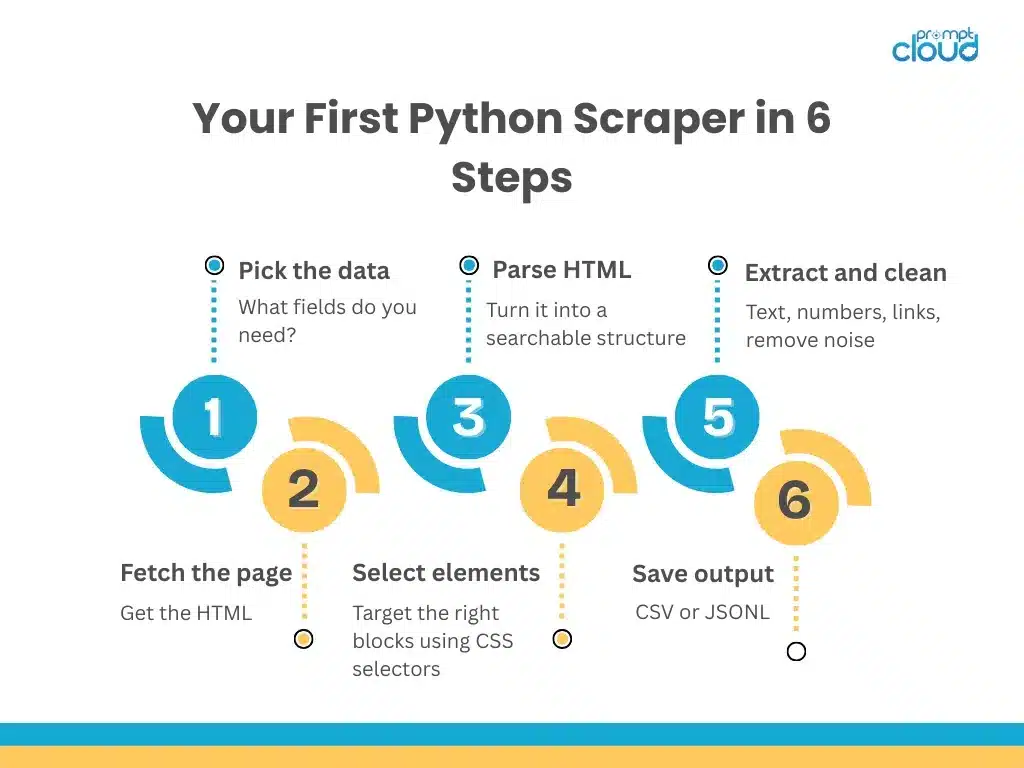
With the structure understood, the scraper itself is short. The pattern is always the same: fetch the page, parse it, locate the container that repeats, and pull the fields you need from each one.
import requests

from bs4 import BeautifulSoup

url = "https://example.com/products"

resp = requests.get(url, headers={"User-Agent": "Mozilla/5.0"}, timeout=20)

resp.raise_for_status()

soup = BeautifulSoup(resp.text, "html.parser")

rows = []

for card in soup.select("div.product-card"):

    title = card.select_one("h2.title")

    price = card.select_one("span.price")

    rows.append({

        "title": title.get_text(strip=True) if title else "",

        "price": price.get_text(strip=True) if price else "",

    })

print(rows)
This script fetches a listing page, confirms the request succeeded, parses the HTML, and loops over each product card to extract a title and price. The defensive checks matter: when a selector returns nothing, the guard keeps the script running instead of crashing on the first missing field.
Before scaling to thousands of pages, validate. Confirm the fields are populated, test the selectors across several pages, and clean the output by trimming whitespace and converting prices to numbers. Scaling a broken scraper only multiplies the mess.
It is worth being honest about what a first attempt buys you. A beginner script for web scraping in Python will pull clean data from a friendly page and then stumble on the next site that nests its markup differently. That is normal. The skill is not writing one perfect scraper, but building a repeatable pattern, fetch, parse, locate, extract, validate, that you can point at new targets without starting over each time.
Handling the Realities of Scale
A scraper that works on one page meets a different world at scale. The hard problems are rarely about code. They are about how websites behave when you ask them for a lot of data.
It helps to name the forces involved. Most web scraping in Python projects degrade for one of four reasons: the site paginates in a way the scraper does not follow, the content renders client-side, the site actively defends against bots, or the markup quietly changes. Each has a standard countermeasure, and recognising which one you are facing is half the battle.
Pagination and infinite scroll. Lists rarely sit on a single page. Page-based URLs are simple to iterate, but infinite scroll and “load more” buttons pull data through background requests. The reliable move is to open the Network tab, find the XHR or API call that returns the data as JSON, and request that directly instead of simulating scrolling.
JavaScript rendering. Many sites send a near-empty HTML shell and fill it in with JavaScript, so plain requests sees nothing useful. When the data only appears after render, a headless browser like Playwright loads the page as a real browser would. When the data sits behind a JSON endpoint, calling that endpoint is faster and far more stable than rendering.
Anti-bot defences. This is the defining challenge of 2026. Services such as Cloudflare and Akamai fingerprint browsers, watch request patterns, and serve CAPTCHAs or empty pages to traffic that looks automated. Rotating proxies and user-agents, randomising delays, sending browser-like headers, and respecting robots.txt have all moved from optional to necessary, and aggressive targets can still require dedicated infrastructure to access reliably.
Rate limits and structure changes. Hammering a site invites timeouts, throttling, and bans, so a slower scraper that runs every day beats a fast one that fails unpredictably. Because sites constantly rename classes and reorder fields, extraction logic should lean on stable, semantic patterns rather than brittle positional selectors. Pair that with monitoring so a quiet drop in extracted rows raises an alert instead of corrupting a dataset for weeks.
Storing Scraped Data So It Stays Usable
Extraction is only half the job. Data that sits in a terminal or a tangle of inconsistent files is not usable data. Choose a format based on how the output will be consumed. CSV works for small, stable, tabular results that analysts open directly. JSON Lines is a flexible default for pipelines, with one record per line and room for fields to evolve. A database earns its place when you need querying, deduplication, and incremental updates across runs.
Two habits make stored data trustworthy. Keep raw and cleaned outputs separate, so you can always trace a value back to the page it came from. And write a short run manifest for every job, recording the date, the row counts, and any errors, so that when yesterday’s dataset looks half the size, you can answer why in minutes rather than days.
A Production Checklist for Web Scraping in Python
The gap between a script that runs and a scraper you can depend on comes down to a handful of habits. Build these in early and the same code survives real sites.
- Validate every row against a schema. Decide which fields are mandatory, then divert rows that miss them into a separate file with the page URL attached. An empty title is almost always a broken selector, not a page without a title.
- Treat selectors as configuration. Keep them in one named place, or a JSON or YAML file when you support multiple sites, so a layout change becomes a config edit rather than a code rewrite.
- Log what matters. Record start and end times, pages fetched, items extracted, items rejected, and any non-200 responses. That turns a midnight failure into a five-minute diagnosis.
- Scrape politely. Cap concurrency per domain, randomise delays, retry only on transient errors like 429 and 5xx, and stop after repeated blocks instead of hammering the site.
- Prefer JSON endpoints over browser automation. If the data returns as JSON from an XHR call, take it there. Rendering should be the last resort, not the default.
- Add a change detector. Compare each run’s row count against a rolling baseline and alert on a sharp drop, because scrapers usually fail quietly by returning less rather than by crashing.
None of this requires a heavy framework. It is a short list of guardrails that decide whether your data can be trusted on the morning someone actually depends on it.
requests, Scrapy, or Playwright: Choosing Your Approach
There is no single best tool for web scraping in Python. The right choice depends on how the target site delivers its data, and picking wrong wastes days. The table below maps common scenarios to the approach that fits.
| Scenario | Best approach | Why it fits | Main tradeoff |
|---|---|---|---|
| Static pages, simple HTML | requests + BeautifulSoup | Fast to build and easy to maintain | Breaks when data loads via JavaScript |
| Crawling many pages at scale | Scrapy | Built-in concurrency, retries, and pipelines | More setup and a steeper learning curve |
| JavaScript-rendered content | Playwright or Selenium | Loads pages like a real browser, can scroll and click | Slower, heavier, harder to scale |
| Data behind XHR or API calls | requests to the JSON endpoint | Faster and more stable than rendering | Requires inspecting network traffic |
| Strict blocking or shifting layouts | Managed scraping pipeline | Lower maintenance, higher reliability | Less hands-on control |
The practical rule is to use the lightest tool that returns the data. Start with requests and BeautifulSoup, reach for Playwright only when rendering is genuinely required, and bring in Scrapy when you are following links across many pages and need its scheduling and pipeline machinery. Mixing them is normal: a Scrapy project can hand individual pages to a parser, and a requests-based job can fall back to Playwright for the few pages that need it.
The cost of each step up is not just runtime. Browser automation needs more memory and careful concurrency control, and managed infrastructure trades some control for reliability. Matching the tool to the page is what keeps the whole system lean.
In practice, most teams doing serious web scraping in Python end up with a small toolkit rather than a single library. A typical setup uses requests for the easy targets, keeps Playwright ready for the handful of pages that demand a browser, and graduates to Scrapy once link-following and scheduling become the main job. The art is adding each tool only when a real problem calls for it.
When DIY Scraping Becomes a Maintenance Burden
Building your own scraper is the right call when the scope is contained: a one-off dataset, a few static pages, an internal experiment, or any job where the occasional miss costs little. You keep full control over what you collect and how.
The economics change once the data becomes something the business relies on. Teams almost always follow the same arc. They start with a script, then add retries, validation, logging, scheduling, and monitoring, until the scraper has quietly become a system. From there the real work is no longer writing Python. It is keeping data accurate while layouts shift, anti-bot systems tighten, and stakeholders expect a fresh dataset every morning rather than an explanation of last night’s failure.
The hidden cost is maintenance, not the initial build. Chasing broken selectors, managing proxy pools, investigating missing records, and rebuilding pipelines when requirements change all consume the engineering time that was supposed to go toward using the data. When more hours go into keeping the scraper alive than into the insights it produces, the DIY model has passed its useful point.
The maintenance tax on web scraping in Python is easy to underestimate at the start. A single site is trivial to watch. Thirty sites, each with its own layout quirks and defences, turn selector upkeep into a recurring job that never quite ends. Multiply that by a daily schedule and a stakeholder who needs the data by nine in the morning, and the script you wrote in an afternoon now owns a slice of someone’s week.
At that stage it is worth comparing managed options honestly. Teams evaluating providers often weigh a CrawlNow alternative when they need broader site coverage, or look at a Datamam alternative when enterprise reliability and compliance top the list. The goal is not to abandon Python, but to stop spending it on plumbing.
How PromptCloud Handles Web Scraping in Python Workloads Without the Overhead
When the maintenance load outweighs the value, PromptCloud runs the entire extraction layer as a managed service. You define the sources, the fields, and the delivery cadence, and the platform handles crawling, JavaScript rendering, anti-bot and proxy infrastructure, schema validation, and structured delivery into an API, database, or file format your systems already use.
That removes the work that makes self-built scrapers fragile: no selectors to repair on a Monday morning, no proxy pools to babysit, and no silent coverage drops slipping into reports. Teams that have outgrown DIY and are weighing a Grepsr alternative or a fully managed feed get the same clean, compliance-ready data without staffing a team to maintain it.
Getting Web Scraping in Python Right, From Script to System
Web scraping in Python is easy to start and deceptively hard to sustain. A few lines of requests and BeautifulSoup can pull real data within an hour, and that hands-on understanding is genuinely valuable. It teaches you how pages load, how selectors break, and why clean data is harder than it looks.
The turning point is always the same. The work shifts from getting some data to depending on it, and at that moment success stops being about clever parsing and starts being about coverage, freshness, validation, and an anti-bot environment that tightens every year. A scraper that runs is the easy part. A scraper that stays accurate while the web changes underneath it is the real deliverable.
So build your own when the stakes and the scale are low, and design for reliability from the first line when they are not. When the plumbing starts crowding out the insight, hand the infrastructure to a managed pipeline and keep your Python skills aimed at the questions only your team can answer. Either way, the fundamentals of web scraping in Python stay the same: understand the page, target it precisely, validate relentlessly, and respect the sites you pull from.
Tired of scrapers that break every time a site changes?
• No contracts. • No credit card required. • No scrapers to babysit.
FAQs
1. Is Python a good language for web scraping in Python projects in 2026?
Yes. Python remains the industry standard for web scraping in Python because it pairs beginner-friendly syntax with the largest ecosystem of scraping libraries available. It handles everything from simple static-page extraction to browser automation and large-scale crawling, so the same language carries a project from first script to production pipeline.
2. What is the difference between web scraping and web crawling?
Scraping extracts specific data from pages you already know. Crawling discovers pages by following links across a site. Most real projects combine both: a crawler finds the pages, and a scraper pulls the fields from each one.
3. Which Python library should I use: requests, BeautifulSoup, Scrapy, or Playwright?
Use the lightest tool that returns the data. requests plus BeautifulSoup covers most static pages, Scrapy suits large multi-page crawls that need retries and pipelines, and Playwright or Selenium handles JavaScript-rendered content. Many projects mix them as needed.
4. How do I scrape a website that loads its content with JavaScript?
Plain requests only sees the initial HTML, so JavaScript-rendered data is missed. First check the Network tab for an XHR or API call that returns the data as JSON and request that directly, which is faster and more stable. If the data only appears after render, use a headless browser such as Playwright.
5. How do I avoid getting blocked while scraping?
Blocks come from automated patterns: a default user-agent, a single IP, and machine-speed requests. Rotate proxies and user-agents, add randomised delays, send browser-like headers, respect robots.txt, and back off after errors. Heavily protected sites may still need dedicated anti-bot infrastructure.
6. Is web scraping legal?
Scraping publicly available data is generally permissible, but it depends on the data type, the site’s terms of service, robots.txt, and local laws such as data-protection regulations. Avoid personal or copyrighted data without a legal basis and seek advice for large-scale or high-stakes projects.
7. How should I store scraped data in Python?
Match the format to how you will use the data. CSV suits small, stable, tabular datasets, JSON Lines is a flexible default for evolving schemas, and a database is best when you need querying, deduplication, and incremental updates. Keeping raw and cleaned outputs separate makes debugging far easier.
8. Can Python scrapers scale to millions of pages?
Yes, but not as a single loop. At that scale you need concurrency, distributed queues, robust retries, proxy rotation, validation, and monitoring, often built on Scrapy or a managed pipeline. The bottleneck is usually anti-bot handling and reliability, not raw Python speed.
9. How often should I run a scraper to keep the data fresh?
It depends on how quickly the source changes and how fresh your consumers need it. Prices or inventory may need hourly or daily runs, while reference data may only need a monthly refresh. Match the schedule to the requirement rather than scraping more often than necessary.
10. When should a team stop building scrapers and use a managed service?
When maintenance starts outweighing value: engineers spending more time fixing selectors and proxies than using the data, unpredictable coverage, or several teams depending on one fragile feed. At that point a managed pipeline usually costs less than the engineering time a DIY scraper consumes.