




**TL;DR**
LLMs do not perform well when they receive messy, unstructured, or unlabeled web data. This blog explains how to shape raw web data so it becomes useful training material for LLMs. You will also learn how reproducibility, version control, and compliance logs keep the entire pipeline stable as your datasets grow.
An Introduction to Labeling Web Data
Most teams think LLM performance comes from model size or training strategy. In reality, the biggest leaps often come from the quality of the data you feed the model. When the input is raw web data, the gap between “scraped” and “usable for training” is enormous. Web pages contain noise, nested structures, irregular patterns, dynamic fields, and inconsistent semantics. None of this maps cleanly to how an LLM learns. If you send the model messy text or loosely formatted JSON, it tries to guess what each field means. That guesswork leads to hallucinations, weak generalization, and inconsistent outputs.
Structured and labeled data removes that uncertainty.
- It gives the model a clear map of relationships.
- It tells the model what each field represents.
- It teaches the model which pieces of information belong together.
When you apply schema markup, ontology definitions, and systematic labeling workflows, the model receives signals instead of fragments. These signals help the model understand context, hierarchy, intent, and meaning. Even small improvements in structure can produce major gains in accuracy and stability.
Think of this tutorial as the developer’s guide to turning raw web data into LLM training fuel. You will learn why structure matters, how to label data consistently, how to define ontology layers, and how to create JSON schemas that LLMs can learn from.
Want proxy rotation that stays stable across regions and traffic spikes?
Why LLMs Need Structured and Labeled Web Data
LLMs are excellent at interpreting patterns, but they are terrible at guessing structure. When you give them raw web data, they try to infer meaning from formatting, spacing, or whatever accidental cues appear in the text. This is fine for conversational tasks. It is not fine when you want the model to understand product attributes, category hierarchies, pricing logic, metadata fields, or relationships between entities.
- Web data adds another challenge.
- It is messy by design.
- HTML structure varies.
- Attributes appear and disappear.
- Content loads asynchronously.
- Fields mean different things on different sites.
Two products that look similar to a human might show completely different HTML patterns to a scraper. This is where structure and labeling become critical. By shaping the data before the model sees it, you remove ambiguity. You give the model clearly defined signals instead of expecting it to decode arbitrary web patterns.
Here is what structure and labeling achieve.
They create consistency.
A price is always a price. A category is always a category. A title is always a title. This predictable format helps LLMs learn faster.
They create semantic clarity.
An annotation like “feature”, “benefit”, “material”, or “risk” tells the model how a phrase should be interpreted. Without labels, the model treats everything as equal text.
They create trainable relationships.
Once the data has a schema and an ontology, the model sees relationships such as parent category, attributes, variants, and dependencies. These relationships allow LLMs to reason rather than memorize.
They reduce noise.
Unstructured web data is filled with boilerplate text, hidden fields, markup artifacts, and UI fragments. Structuring removes what does not matter and keeps only what trains the model effectively.
When structure and labeling are done well, the LLM behaves more predictably. It learns from clean signals. It produces fewer hallucinations. It generalizes better across industries and tasks. This tutorial will now walk through the exact steps developers use to shape raw web data into high value training input.
The Foundation: Schema Design for Web Data
Before you think about labels or ontologies, you need a clear schema. The schema is the contract between your crawlers, your storage layer, your validation checks, and the LLM that will eventually see the data. If that contract is fuzzy, everything that sits on top of it becomes fragile.
The goal of a schema is simple. It should answer three questions for every field.
- What does this field represent
- What type of value does it hold
- How will the model use it
Once you can answer these consistently, the rest of the pipeline becomes easier to manage.
A practical approach to schema design for web data looks like this.
Step one: Start from the use case, not the page layout
Begin with the questions your LLM must answer or the tasks it must complete. For example, product comparison, content summarization, attribute extraction, or risk flagging. List the fields that truly matter for those tasks. Ignore anything that only reflects presentation or layout.
Step two: Group fields into logical blocks
Think in terms of entities plus relationships. Each block can then be handled in a consistent way during parsing / labeling.
Step three: Define types and constraints
Decide which fields are text, categorical, booleans, arrays or nested objects.
Step four: Check for missing data values
Web data is often partial. This balance matters a lot once you start training.
Every field has a type and a requirement flag. Downstream code can use this to:
- validate incoming records
- decide which fields must be present before training
- standardize prompts for the LLM
Once a schema is defined, treat it as a living document, but also as a controlled artifact.
Good schema practice for LLM training usually includes:
- Versioning the schema so you can trace which model used which structure
- Writing short human readable descriptions for each field
- Marking which fields are safe to show in prompts and which should remain internal
- Capturing default values or fallback logic for partially missing attributes
When developers treat schema design as the foundation, the rest of the structuring and labeling work becomes more predictable. It turns raw web pages into well defined objects that an LLM can actually learn from instead of guessing around.
Normalizing Web Data
This is the part most teams underestimate. They assume that once fields are mapped, the data is “structured.”
You are solving 3 problems together:
- Different sites representing the same thing in different ways
- Inconsistent formatting within the same source
- Extra noise that looks useful but breaks patterns during training
A practical normalization workflow often follows these stages.
Stage one: Map raw fields to schema fields
Take the raw HTML or JSON from each source and map its fields into your canonical schema. For example, price_value, current_price, and offerPrice might all become price. This is where you collapse aliases into one standard name.
Stage two: Standardize types and formats
Convert everything that should be numeric into numbers.
Stage three: Normalize categories and enums
Different sites may call the same category “Cell Phones”, “Mobiles”, or “Smartphones”. During normalization you map all of them to a single controlled label. This is essential for training LLMs on consistent taxonomies.
Stage four: Handle missing or partial data gracefully
If a field is missing but non critical, you might leave it as null.
Normalization does a few important things for LLM training.
- It strips away source specific quirks such as “out of 5” text
- It keeps only the attributes that matter for the model
- It expresses everything in predictable shapes and types
To keep normalization healthy over time, developers usually add lightweight checks.
- Percentage of records that fully match the schema
- Count of unexpected values for enum fields
- Simple histograms for numeric ranges to catch weird spikes
When normalization is treated as a first class step rather than an afterthought, your training data becomes much easier to reason about. The LLM no longer has to decode a hundred different formats for the same concept. Instead, it learns from a consistent, well structured representation of the web.
Labeling Web Data for LLM Training
Structuring your data gives the model a clean foundation. Labeling gives it meaning. Labels tell the LLM what each part of the record represents, which relationships matter, and how different pieces of information should be interpreted. Without labels, the model sees the data as plain text. With labels, the model sees entities, attributes, relationships, and intent.
Labeling is not just annotation.
It is controlled communication between you and the model.
A practical labeling workflow usually focuses on three goals.
- Teach the model how to interpret fields
- Teach the model how to link fields together
- Teach the model how to apply these patterns to new data
Here is how developers typically build this into a repeatable process.
Step one: Define label categories
- Title segments
- Features
- Benefits
- Risks
- Materials
- Variants
- Sentiment phrases
- Pricing phrases
For job data you might label:
- Skills
- Experience requirements
- Compensation details
- Location elements
- Role seniority
For real estate data you might label:
- Property features
- Amenities
- Condition descriptions
- Pricing attributes
- Location cues
These become your label vocabulary.
Step two: Apply labels as structured spans
{
“text”: “These wireless headphones offer 40 hours of battery life and active noise cancellation.”,
“labels”: [
{ “span”: “wireless headphones”, “label”: “product_type” },
{ “span”: “40 hours”, “label”: “battery_life” },
{ “span”: “active noise cancellation”, “label”: “feature” }
]
}
Step three: Establish label consistency rules
Labels only work if they appear consistently across examples. Consistency comes from rules such as:
- A feature must be a functional property
- A benefit must describe user value
- A risk must indicate a limitation or drawback
- A material must describe physical composition
- A spec must contain a measurable attribute
These rules prevent drift. They also make model outputs more reliable.
Step four: Annotate at scale using patterns
Manual labeling is expensive, so developers often bootstrap labels using patterns, regular expressions, weak supervision, or small rule based annotators.
Examples:
- Battery life phrases often include hours
- Discounts include numeric percentages
- Material descriptions include “made of” or “constructed from”
- Experience requirements include years
Weak labeling gives you a fast baseline. Human labeling gives you accuracy. Together they form a scalable training dataset.
Step five: Store labels alongside structured records
A labeled record usually looks like this.
{
“record”: {
“title”: “Noise Cancelling Headphones X1”,
“brand”: “SoundMax”,
“category”: “Headphones”,
“price”: 99.99
},
“labels”: {
“brand”: “entity”,
“category”: “taxonomy”,
“price”: “numeric_attribute”
}
}
Developers sometimes store both text-based spans and schema-level labels, depending on the downstream task.
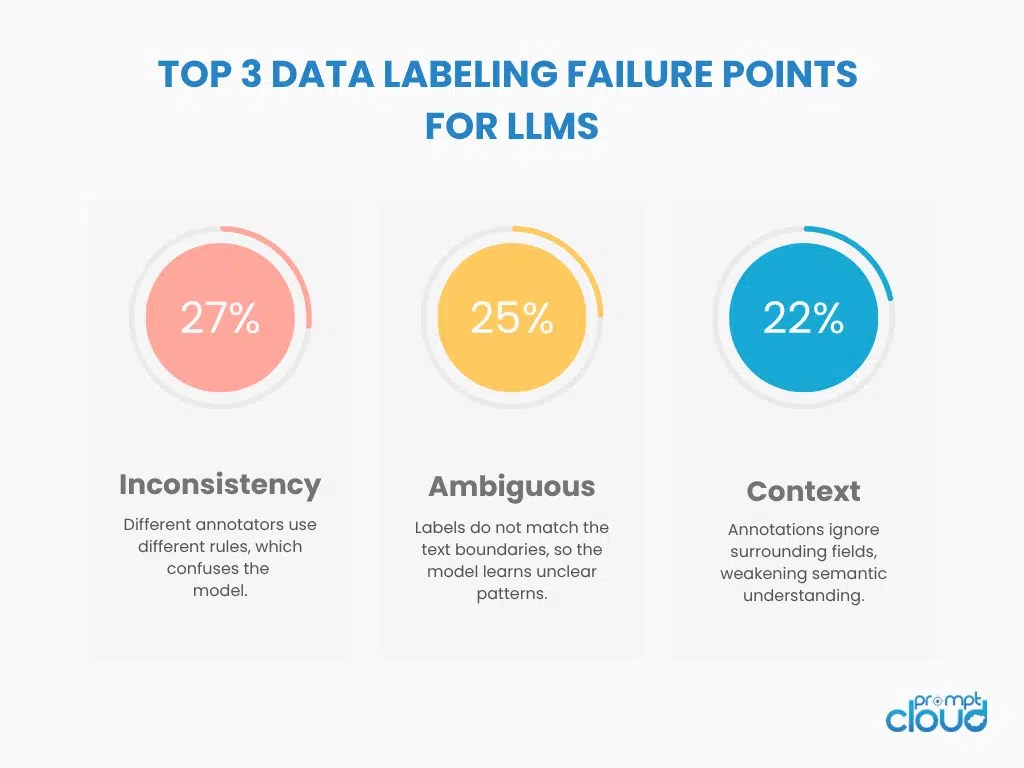
Figure 1: Key issues that affect the quality and consistency of labeled training data.
Building Ontologies for LLM Understanding
Schemas define structure. Labels define meaning. Ontologies define relationships.
An ontology gives the LLM a map of how concepts relate to each other in your domain. Without an ontology, the model sees individual fields. With an ontology, the model sees hierarchy, inheritance, grouping, similarity, and dependency. This is the layer that helps an LLM go from pattern matching to reasoning.
Ontologies are especially important for web data because no two sites arrange information the same way. A well designed ontology helps unify these differences into a single conceptual framework the model can trust.
Here is the simplest way to think about an ontology. It answers three questions:
- What are the core entities in this domain
- How do those entities relate
- Which properties describe each entity
A well built ontology makes your structured and labeled dataset far more powerful for training or fine tuning.
Table 1: Examples of Ontology Entities and Their Roles
| Entity Type | What It Represents | Why It Matters for LLMs |
| Product | The primary item or listing | Anchor for all related attributes and features |
| Attribute | A descriptive property such as size or material | Helps LLMs learn attribute extraction and comparison |
| Category | A taxonomy node such as Electronics or Apparel | Teaches hierarchical reasoning |
| Variant | Different versions of the same product | Helps the model distinguish similar items |
| Review | User generated feedback | Supports sentiment learning and summarization |
| Seller | The source or merchant | Useful for comparison and ranking |
| Price Event | Change in pricing or availability | Important for time based reasoning |
Ontologies usually follow a logical layering approach.
Layer one: Core entities
These are the highest level concepts such as product, job, property, article, vehicle, or listing.
Layer two: Attributes and descriptors
Each entity is described by a fixed set of properties. For example, a job has skills, requirements, compensation, and seniority.
Layer three: Relationships and hierarchies
Relationships describe how entities connect.
Examples:
- A product belongs to a category
- A job requires skills
- A property has amenities
- A vehicle includes components
- An article cites sources
Hierarchies help the LLM reason upward or downward in the taxonomy.
Layer four: Rules and constraints
These define how the domain behaves. Examples:
- A category must have a parent unless it is a root node
- Price must be numeric
- Seniority level must be one of: entry, mid, senior
- A skill cannot be both soft skill and technical skill at the same time
Here is a small JSON example of how developers often express ontology relationships.
{
“entity”: “Product”,
“properties”: [“title”, “brand”, “category”, “price”],
“relationships”: {
“belongs_to”: “Category”,
“has_variant”: “Variant”,
“has_reviews”: “Review”
}
}
This tells the LLM two things. The structure is stable. The relationships are predictable.
Table 2: Ontology Layering for Web Data
| Layer | Description | Example |
| Entity Layer | Core domain objects | Product, Job, Property |
| Attribute Layer | Descriptive fields | Price, Skills, Amenities |
| Relationship Layer | Logical connections | belongs_to, requires, includes |
| Hierarchy Layer | Taxonomy structure | Electronics > Audio > Headphones |
| Rule Layer | Constraints and logic | Allowed values, parent rules, uniqueness |
A well defined ontology gives the LLM a semantic backbone. It learns which concepts are central, which are dependent, and which are modifiers. This makes its reasoning far stronger and its outputs much more aligned with real domain logic.
Creating Training Ready JSONL Files
Once your data is structured, normalized, labeled, and linked through an ontology, the next step is packaging it into a format your LLM can actually train on. JSONL is the standard choice for most modern LLM frameworks. Each line is a separate training example. Each line contains both the input and the target structure. This makes the dataset easy to stream, inspect, validate, and scale.
Think of JSONL as the final delivery format. Everything before this step prepares the data. Everything after this step depends on the quality of these files. Developers generally follow a predictable workflow for assembling JSONL files that hold up during training.
Step one: Convert normalized records into model friendly inputs
Your structured data becomes the context. Labels and ontology signals become the instructions that guide the model. A minimal record might look like this:
{
“input”: {
“title”: “Noise Cancelling Headphones X1”,
“brand”: “SoundMax”,
“features”: [“active noise cancellation”, “40 hour battery”]
},
“target”: {
“category”: “Headphones”,
“material”: “Plastic”,
“use_case”: “Travel”
}
}
LLMs learn best when the input fields are predictable and the target fields are consistently structured.
Step two: Add ontology hints inside the JSONL
Ontology signals help the model reason instead of guessing.
Your training example might include a semantic hint block.
{
“ontology”: {
“entity_type”: “Product”,
“relationships”: [“belongs_to: Category”]
}
}
This makes it easier for the LLM to connect structured fields to their conceptual roles.
Step three: Maintain one example per line
This matters for scalability. Line based processing lets you run distributed training jobs, resume training mid stream, or filter examples without touching the whole file.
Training frameworks like HuggingFace, OpenAI fine tuning, and custom LLM pipelines all rely on JSONL because it is simple and efficient.
Step four: Include both text based and field based examples
LLMs learn better when they see both styles.
- Field based examples teach extraction and classification
- Text based examples teach comprehension
Here is a small hybrid example.
{“text”: “These headphones offer 40 hours of battery life.”, “label”: “battery_life”, “value”: “40 hours”}
{“text”: “Constructed from durable plastic materials.”, “label”: “material”, “value”: “Plastic”}
This gives the model the ability to interpret both structured attributes and natural language.
Step five: Add lightweight validation before training
Developers often validate JSONL files using simple checks.
| Validation Type | What It Detects | Why It Matters |
| Field presence | Missing required attributes | Prevents incomplete examples from weakening training |
| Type checks | Numeric vs text vs list mismatch | Ensures consistent model expectations |
| Label consistency | Drift in how labels are applied | Keeps training stable |
| Ontology alignment | Mismatched relationships | Prevents contradictory signals |
| Duplicate detection | Repeated examples | Reduces overfitting |
These checks take seconds but prevent hours of debugging later.
Step six: Version your JSONL files
Version control is mandatory. Even small changes to the schema or labels change the meaning of the dataset. Versioning helps you:
- Track experiments
- Repeat training runs
- Reproduce results
- Compare performance across dataset versions
Most teams use naming patterns such as:
- dataset_v1.0.jsonl
- dataset_v1.1_normalized.jsonl
- dataset_v2.0_labeled.jsonl
This also supports compliance logs and audit needs.
Creating high quality JSONL files is the bridge between raw web data and LLM ready training material. When structured well, your model receives a continuous supply of clean, semantically clear, and context rich examples that dramatically improve performance. When JSONL files are rushed or inconsistent, the entire training pipeline becomes unstable.
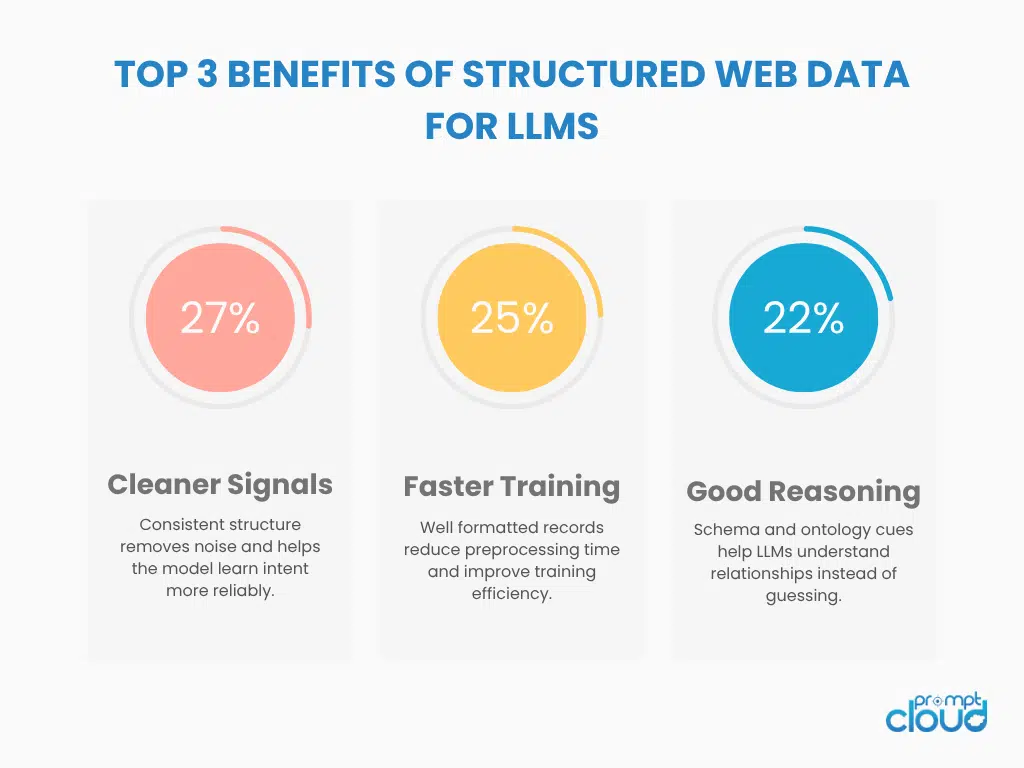
Figure 2: How structured web data improves LLM training outcomes.
Validation and Reproducibility Workflows for LLM Data Pipelines
At this stage of the pipeline, you have structured data, labeled entities, defined ontologies, and packaged examples in JSONL format. The last piece is making sure this entire process is reproducible. AI systems fail quietly when data changes over time without version tracking or proper validation. A stable LLM pipeline depends on knowing exactly which dataset produced which model behavior.
Validation keeps the dataset trustworthy. Reproducibility keeps your experiments meaningful.
A consistent workflow usually includes a few simple components.
Component one: Schema level validation
Each batch of data should be checked against your schema. Missing fields, unexpected types, or new values in enum fields signal drift. These checks should run automatically before any training.
Component two: Label audit
Labels tend to drift as new annotators join or as patterns change across sources. Periodic sampling and comparison against your labeling rules keeps the vocabulary consistent. Even a small inconsistency can confuse the model during fine tuning.
Component three: Ontology alignment checks
Changes in taxonomy or relationships should be flagged. If a category gets renamed or reorganized, the ontology must update in sync. Otherwise, the model learns outdated hierarchies that create noisy predictions.
Component four: JSONL consistency checks
Developers typically verify that each line contains the required input fields, target fields, and metadata. These checks prevent malformed examples from weakening the training signal.
Component five: Version controlled datasets
Every dataset should have a unique version number. When you compare two training runs, versioning lets you explain what changed. When someone else needs to rerun your experiment, versioning gives them a stable reference point.
A reproducible pipeline is not just a technical convenience. It is the only way to build LLMs that stakeholders can trust. When you know precisely which dataset created a specific outcome, tuning becomes easier, debugging becomes simpler, and deployment becomes far less risky. At this point, your raw web data has completed its journey from scraped to structured, from structured to labeled, and from labeled to LLM ready.
Further Reading From PromptCloud
Here are four related resources that deepen your understanding of structured web data and AI readiness:
- Learn how advanced extraction supports machine learning in our guide on data mining techniques.
- Understand how data transformations shape predictive systems in banking and finance datafication.
- Explore a hands on workflow for converting structured extractions into files in Export Website to CSV.
- See how crawlers explore different layers of the internet in Surface Web, Deep Web, Dark Web Crawling.
For a deeper look at how structured data, ontologies, and metadata improve AI reliability, the W3C’s “Data on the Web Best Practices” framework is a strong resource.
Want proxy rotation that stays stable across regions and traffic spikes?
FAQs
1. Why does schema design matter so much when training LLMs with web data?
Because LLMs struggle with ambiguity. A schema tells the model exactly what each field represents. When every record follows the same structure, the model learns relationships instead of memorizing noise. Without a schema, even small format differences create inconsistent outputs.
2. How much labeling is enough to improve model quality?
You do not need millions of labeled examples. You need consistent ones. If the label rules stay stable, a few thousand high quality examples often outperform a large but inconsistent dataset. The goal is clarity, not volume.
3. Can an LLM learn without an ontology?
It can learn patterns, but it will not learn domain logic. An ontology teaches hierarchy, dependencies, and semantic boundaries. Without it, the model may understand text but misunderstand relationships. This is where most hallucinations come from.
4. Why use JSONL instead of CSV or plain JSON for LLM training?
JSONL handles nested structures easily and keeps each example on its own line. This makes validation, streaming, filtering, and versioning simple. CSV breaks when fields contain arrays or nested objects, and plain JSON becomes unwieldy at scale.
5. What is the biggest mistake teams make when preparing LLM training data?
They focus on cleanup and ignore reproducibility. If you cannot recreate the exact dataset that produced a specific model behavior, you lose control of experimentation. Versioning, validation, and clear schemas matter as much as labeling.