




**TL;DR**
eCommerce AI isn’t just powered by product titles and prices anymore. To train better recommendation engines, search ranking systems, and visual discovery tools, brands need to extract and structure rich product media: images, demo videos, zoom views, and specification sheets—all from public product detail pages (PDPs). But this isn’t just a matter of “right-click, save.” You need multimodal scraping pipelines that can handle image deduplication, OCR for specs, video stream extraction, and schema mapping for media fields. This guide shows how PromptCloud helps you scrape PDP media at scale—cleanly, legally, and in formats your AI stack can actually use.
What AI Can Do With Scraped Product Media:
| Scraped Media | AI Use Case |
| Product Images (multiple angles, zooms) | Fine-grained visual search, similar item detection |
| Demo Videos / Unboxing | Engagement scoring, sentiment analysis from frames |
| Specs as Images / PDFs | OCR → key spec extraction, product comparison models |
| Brand Logos & Badges | Brand classification, certification validation |
| Size Charts, Warranty Cards | Size recommendation, post-sale service automation |
This is where image scraping, video scraping, and OCR for structured spec extraction come into play. And no, scraping just a product title and price won’t cut it in 2025.
What Counts as “Multimodal” Data in Web Scraping (and Why PDPs Are Goldmines)
In web scraping, multimodal doesn’t just mean “more than one type of data.” It refers to data types that require different extraction techniques, different post-processing workflows, and different delivery formats—but all relate to the same entity, like a product listing.
A product detail page (PDP) is a perfect example of a multimodal goldmine. Here’s what it usually contains:
Typical Data Types on a Product Detail Page
| Mode | Example Fields | Extraction Approach |
| Text (structured) | Product title, price, SKU, shipping info | DOM parsing, CSS/XPath selectors |
| Text (unstructured) | Description, reviews, Q&A | Text block segmentation, sentiment analysis |
| Image | Hero shot, alternate angles, zoom view, badges | Image tag scraping + deduplication |
| Video | Demos, unboxing videos, 360° product views | Embedded player scraping, stream extraction |
| Image-as-spec | Size charts, warranty cards, nutritional labels (JPEG/PNG) | OCR + layout parsing |
| Metadata | Stock status, brand, category | JSON-LD, microdata, inline scripts |
Want expert‑built scraping support?
If your scraping layer is already operating like production infrastructure, the conversation about ownership is worth having.
Why This Matters for eCommerce AI
A single SKU might have:
- 5 images across different zoom levels
- 1 demo video
- 2 image-based spec sheets (e.g., PDFs rendered as images)
- Structured + unstructured text blocks
To build a robust AI model, or even to populate a product information management (PIM) system, you need to treat each of these assets as first-class data. That’s where multimodal scraping comes in.
It allows you to:
- Aggregate all media under the right product (not scattered or duplicated)
- Normalize resolutions, formats, and orientation
- Add semantic tags (e.g., front view, back view, lifestyle) using computer vision
- Extract text from images using OCR for use in filters or comparisons
- Classify product videos by category (unboxing, explainer, testimonial)
Scraping Isn’t One-Size-Fits-All
Here’s a quick table showing how different modalities in eCommerce need different tools:
| Modality | Scraping Strategy | Tools/Libraries |
| Text | XPath / CSS Selectors | Scrapy, BeautifulSoup |
| Images | <img> tags, JS-rendered galleries | Playwright, Puppeteer |
| Videos | <video> tags, embedded players (YouTube, Vimeo) | yt-dlp, Selenium, direct stream sniffing |
| Image-as-text | Download + OCR | Tesseract, PaddleOCR, Amazon Textract |
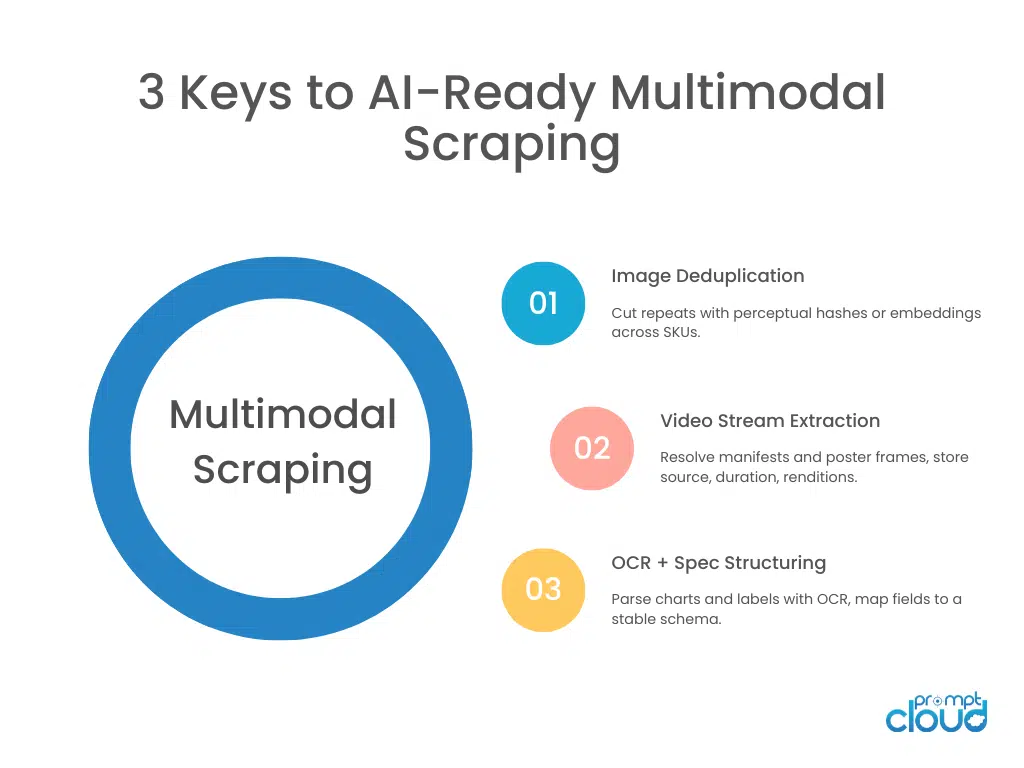
| Visual Deduping | Fingerprint/hash-based comparison | Perceptual Hashing (pHash), OpenCV |
Bottom line? Your scraping system should be able to detect, extract, and differentiate between text, visual, and hybrid media formats from a single product page—and deliver them in formats that downstream AI systems can use reliably.
Why Product Images Need Deduplication, Versioning & Tagging
Most eCommerce brands don’t realize they’re serving duplicate, inconsistent, or even stale images until their AI models start misfiring.
When scraping product images at scale—from Amazon, Walmart, DTC brands, or marketplaces—you’ll encounter multiple challenges:
- Identical images hosted under different URLs
- Images reused across multiple SKUs (e.g., same T-shirt in different colors)
- Slightly altered dimensions or background padding
- CDN-cached versions that don’t reflect recent updates
- Mixed media: lifestyle images vs technical shots vs logos
If you don’t deduplicate, version, and tag your images correctly, you risk building a faulty dataset that confuses your AI models or bloats your PIM.
For retail programs that need weekly refreshes across brands, regions, and marketplaces, our eCommerce Data page outlines scale tiers, cadence options, and geo controls used by enterprise teams.
What is Image Deduplication?
Image deduplication identifies and removes visually identical or near-identical images.
Common Use Cases:
- Avoid storing the same image across SKUs or color variants
- Prevent model overfitting on repeated samples
- Reduce storage and delivery costs
How Does Deduplication Works?
| Method | How It Works | Strengths |
| Hash Matching (MD5/SHA1) | Compares file hashes | Fast, but fails on resized/cropped images |
| Perceptual Hashing (pHash) | Converts image to low-res grayscale, hashes perceptual features | Detects near-duplicates, rotation-safe |
| Feature Extraction + Cosine Similarity | Uses CNNs (e.g. ResNet) to compare image embeddings | Works on lifestyle vs technical variants |
Avoid the usual traps—selector drift, pagination gaps, and silent partials—with validation ladders and idempotent delivery; our guide to Common Web Scraping Mistakes lists concrete prevention patterns.
Why Versioning Is Critical
Web images are volatile. Product photos are updated, replaced, or rehosted silently.
Example: An image scraped on Jan 1 has a green background. On Jan 15, the brand updates it to white. If your AI is using the older image, your model may misclassify color palettes or lifestyle context.
Solution: Implement timestamped versioning. Save:
- product123_hero_2025-09-01.jpg
- product123_hero_2025-09-15.jpg
This allows you to track changes, retrain on updated assets, or roll back in case of drift.
Semantic Image Tagging for PIM
For your PIM system or AI application to make sense of scraped images, they must be tagged contextually.
Example Tags:
- front_view, back_view, side_view
- with_model, without_model
- packaging, accessory, badge, lifestyle
Bonus: Multimodal Alignment
When scraping images, also grab the alt-text, JSON-LD tags, or surrounding HTML context. These clues can help align the visual with the textual—for example:
<img src=”…” alt=”Red cotton shirt front view”> → pairs with the product color and category
This alignment improves downstream AI performance in search, recommendations, and QA.
How Video Scraping Works (and Why It’s Not Just YouTube Links)
Product videos live in many places and formats: embedded players (YouTube, Vimeo), first‑party CDNs, progressive MP4s, HLS/DASH playlists, even auto‑playing 360° views rendered via JavaScript. Treating all of them as “a link to copy” leads to missed assets, broken playback, or incomplete metadata.
Where PDP Videos Typically Live
| Source type | What you see on page | What’s actually fetched | Notes |
| YouTube/Vimeo embed | <iframe> with provider URL | Provider API/player JSON; adaptive streams | Use the official oEmbed or provider API for metadata; respect provider ToS. |
| First‑party CDN | <video> or custom JS player | Direct MP4, WebM, HLS (.m3u8), or DASH (.mpd) | Often references signed URLs; sniff network calls in a headless browser. |
| PWA/JS gallery | Thumbnails that switch video on click | On‑demand JSON config that resolves to stream URLs | Requires Playwright/Puppeteer with event interception. |
| 360°/AR viewers | Canvas/WebGL/segment sprites | Tiled sprite sheets, JSON manifests | Treated as image sequences or scene assets, not a single video. |
The Extraction Pattern That Works Reliably
- Render the page the same way a user would.
- Use Playwright with device emulation and networkidle waits to ensure player config loads.
- Intercept network requests while interacting with the video gallery.
- Click thumbnails, “play” buttons, 360° toggles; capture XHR/fetch/manifest calls.
- Click thumbnails, “play” buttons, 360° toggles; capture XHR/fetch/manifest calls.
- Resolve the actual media source.
- Prefer HLS/DASH manifests for adaptive quality; fall back to MP4/WebM.
- Prefer HLS/DASH manifests for adaptive quality; fall back to MP4/WebM.
- Collect metadata for PIM/ML.
- Duration, resolution variants, audio presence, language tracks, frame rate, aspect ratio.
- Duration, resolution variants, audio presence, language tracks, frame rate, aspect ratio.
- Persist a canonical record.
- Store a stable video ID, original source URL, a checksum for each rendition, and a poster frame.
Minimal Playwright pattern to resolve a video source
from playwright.sync_api import sync_playwright
import re, json, time
def resolve_video_sources(url: str):
sources = []
with sync_playwright() as p:
browser = p.chromium.launch(headless=True)
ctx = browser.new_context()
page = ctx.new_page()
# Capture network for manifests/media
media_like = (“.m3u8”, “.mpd”, “.mp4”, “.webm”, “playlist”, “manifest”)
def on_request_finished(req):
try:
r = req.response()
u = req.url
if any(k in u for k in media_like):
ct = r.headers.get(“content-type”,””)
# keep only media/manifests
if any(k in ct for k in [“video”, “application/vnd.apple.mpegurl”, “dash+xml”]) or any(x in u for x in [“.m3u8″,”.mpd”,”.mp4″,”.webm”]):
sources.append({“url”: u, “status”: r.status, “type”: ct})
except Exception:
pass
ctx.on(“requestfinished”, on_request_finished)
page.goto(url, wait_until=”domcontentloaded”)
# Give galleries a moment to load configs
page.wait_for_timeout(1500)
# Try common selectors
for sel in [“button[aria-label=’Play’]”, “.video-thumbnail”, “[data-testid=’video-play’]”]:
if page.locator(sel).count() > 0:
page.locator(sel).first.click()
page.wait_for_timeout(1200)
# Scroll to trigger lazy players
page.mouse.wheel(0, 2000)
page.wait_for_timeout(1200)
browser.close()
# Dedupe by URL
uniq = {s[“url”]: s for s in sources}
return list(uniq.values())
if __name__ == “__main__”:
print(json.dumps(resolve_video_sources(“https://example.com/product”), indent=2))
This doesn’t download media; it discovers the canonical source and gathers content types for downstream policies (e.g., whether to store, transcode, or only keep metadata).
If your PDP gallery loads manifests on click or scroll, treat extraction as an event‑driven workflow with queue backpressure and retries; see Real‑Time Web Data Pipelines for LLM Agents for trigger → queue → scraper patterns that keep media discovery fresh under load.
When to Download vs. When to Reference
- Download full media when:
- You need frame‑level features (keyframe OCR, logo detection, frame embeddings).
- You train or validate computer vision tasks using frames or clips.
- Reference by URL when:
- PIM enrichment just needs resolvable links and posters.
- Legal or storage constraints favor metadata‑only workflows.
A hybrid approach is common: capture a poster image and a short keyframe sample for embeddings, while storing the manifest URL plus renditions.
Frame‑Level Enrichment for AI Use Cases
Once the stream is resolved, you can extract:
- Keyframes at fixed intervals (e.g., every 2 seconds) for visual embeddings.
- On‑frame text via OCR (e.g., promo codes, dimensions).
- Audio presence and language tracks for accessibility classification.
- Scene boundaries to tag sections (unboxing, features, usage demo).
This yields features useful for search ranking (“products with real usage demos”), automated QA (“blurry frames flag”), and model training.
Enriched PDP media and specs flow cleanly into model training and retrieval pipelines when delivered against a stable schema—see PromptCloud’s Data for AI use case for delivery modes (API, S3, streams) and feature‑store alignment.
Compliance and Reliability Considerations
- Respect robots.txt and site terms; follow fair‑use patterns and purpose limitations.
- Avoid hotlinking in production UIs; use signed URLs or your own CDN when serving media you’re licensed to use.
- Track provenance: include source domain, retrieval timestamp, HTTP status, and a media checksum. Provenance is essential for audits and model debugging.
OCR for Spec Sheets, Size Charts, and Labels (Extracting Text from Images Without Losing Structure)
A surprising amount of “specs” on PDPs aren’t text—they’re embedded images: size charts, warranty cards, nutrition labels, comparison grids, and certificates. If you scrape only DOM text, you’ll miss critical attributes (dimensions, materials, wattage, care instructions). OCR closes that gap, but only when paired with layout‑aware parsing and post‑validation.
The Three Layers of OCR That Actually Work
- Pre‑OCR Conditioning
- Normalize resolution and DPI; denoise and de‑skew.
- Convert to high‑contrast grayscale; binarize when helpful.
- Crop to content area (detect tables/boxes to reduce noise).
- Normalize resolution and DPI; denoise and de‑skew.
- OCR + Layout Detection
- Use OCR engines (Tesseract, PaddleOCR, Textract) to extract tokens.
- Detect structure (rows/columns/headers) using table detectors or lightweight vision models so you don’t lose semantic relationships.
- Preserve units (“cm”, “oz”, “V”), unicode symbols, and superscripts.
- Use OCR engines (Tesseract, PaddleOCR, Textract) to extract tokens.
- Post‑OCR Normalization
- Map tokens to expected field names (e.g., “Material” → material_composition).
- Validate with regex/semantic checks (e.g., wattage must be numeric with a unit).
- Assign a schema version and annotate provenance (image hash, selector path, scrape timestamp).
- Map tokens to expected field names (e.g., “Material” → material_composition).
Minimal OCR Pipeline (Pseudo‑Code)
from PIL import Image, ImageOps, ImageFilter
import pytesseract
import re, hashlib, json, time
def ocr_spec_sheet(img_path, product_id):
img = Image.open(img_path)
# preconditioning
gray = ImageOps.grayscale(img)
sharp = gray.filter(ImageFilter.UnsharpMask(radius=1, percent=150, threshold=3))
# OCR
text = pytesseract.image_to_string(sharp, config=”–oem 3 –psm 6″)
# naive field extraction (example)
fields = {}
for line in text.splitlines():
if “:” in line:
k, v = [x.strip() for x in line.split(“:”, 1)]
fields[k.lower().replace(” “, “_”)] = v
# validation example
def as_watts(v):
m = re.search(r”(d+(.d+)?)s*(w|watt)”, v.lower())
return float(m.group(1)) if m else None
result = {
“product_id”: product_id,
“schema_version”: “pdp_specs_v1”,
“fields”: fields,
“derived”: {“wattage”: as_watts(fields.get(“power”, “”))},
“provenance”: {
“image_sha1”: hashlib.sha1(img.tobytes()).hexdigest(),
“scrape_ts”: int(time.time())
}
}
return result

Layout‑Aware Extraction for Tables
When spec tables are raster images, treat them like real tables:
- Run line detection (Hough transform) to locate grids.
- Extract cell images, then OCR each cell to preserve coordinates.
- Reconstruct a DataFrame and map headers to canonical fields.
This allows sku‑to‑sku comparisons (e.g., “blade length”, “thread size”) that vanilla OCR of a single text blob would destroy.
Schema, Evolution, and Provenance
As you enrich PDP media, your metadata schema will evolve (e.g., new tags for “lifestyle vs technical,” poster frames, sample frames, OCR confidence bands). Don’t break downstream consumers—version your schema and register it. See the Apache Kafka Schema Registry documentation for compatibility modes that let you add fields without forcing a big‑bang migration.
How to Structure Media for Delivery: API, S3, or Streams
AI systems, PIM platforms, or product analytics tools don’t want a random dump of images and videos—they want structured payloads with versioned metadata, stable references, and consistent schemas.
Delivery Options for Scraped Media
| Delivery Mode | Best For | Format | Refresh Cadence | Notes |
| S3/Blob Storage | Training datasets, historical logs | Timestamped folders, deduplicated assets | Daily/weekly | Include metadata manifests (JSON) for each batch |
| Streaming API | Real-time ingestion into vector DBs or AI workflows | JSON/Protobuf | On event trigger | Requires idempotency keys, TTL enforcement |
| Webhooks | Lightweight notifications for media changes | JSON with asset pointers | Near real-time | Ideal for notifying changes without pushing bulk data |
| CSV + ZIP | Manual ingestion into internal systems | CSV manifest + media ZIP | Weekly/monthly | Include columns like media_type, tag, hash, source_url |
Metadata Schema Essentials
Every media asset should carry a metadata envelope that includes:
- product_id
- media_type: image, video, OCR_spec, poster, etc.
- tags: lifestyle, technical, demo, badge, etc.
- source_url: original location
- scrape_ts: timestamp
- checksum: SHA1 or perceptual hash
- schema_version: to help consumers validate fields
This is what makes the difference between “just scraped media” and production‑ready data that teams can depend on.
What Good Media Exports Look Like in Production (Checklist)
If you’re building AI applications on top of scraped media, your data needs to be consistent, traceable, and auditable. Here’s a simple field-level checklist for quality control.
| Field | Required? | Typical Format | Validator |
| product_id | Yes | alphanumeric | Must match catalog reference |
| media_type | Yes | image / video / ocr_spec | Enum check |
| tags | Optional | comma-separated keywords | Must match tag dictionary |
| checksum | Yes | SHA1 or pHash | Must be unique across batch |
| schema_version | Yes | string, e.g., v2.1 | Must match contract |
| scrape_ts | Yes | Unix timestamp | Must be within crawl window |
| source_url | Yes | HTTPS URL | Reachable or cached |
| file_size_kb | Optional | Integer | Below threshold (e.g., 5MB) |
| frame_sample | Optional (video) | Base64 or URL | Exists if media_type is video |
These fields should be machine-verifiable before delivery. Your scraping pipeline should attach “reason codes” for any dropped records, e.g., DUPLICATE_IMAGE, BLANK_OCR, STREAM_TIMEOUT.
Common Failure Modes in Multimodal Scraping
| Failure Type | Trigger | Symptom | Root Cause | Prevention | Detection |
| Template drift | Site layout update | Empty tags, missing galleries | Hard-coded selectors | Use CSS class anchors + backup strategies | Field nulls increase |
| Duplicate ingestion | Same image across variants | Redundant records, storage bloat | No hashing or dedupe logic | Perceptual hashing + SKU-level joins | Hash match in batch |
| Partial frames | Slow loads or lazy players | Blurry or half-loaded images | Timeout before media rendered | networkidle wait + scroll events | Visual QA diff |
| Encoding mismatch | Regional CDNs | Garbled text from OCR | Wrong character sets or locale fonts | Normalize OCR locale per domain | Unicode validator |
| Overwrites | Re-scraped SKU loses old media | Inconsistent metadata | No versioning/timestamp logic | Timestamped filenames + version registry | Hash diff over time |
| Stale assets | CDN caching, dynamic links | Outdated media served | No cache-busting or URL expiry | Scrape with headers/cache‑control | TTL monitor + asset change detection |
The most dangerous failures are silent—they don’t crash the scraper, but poison your dataset. That’s why PromptCloud applies validation ladders, TTL gates, and per-record QA to every media export.
Want expert‑built scraping support?
If your scraping layer is already operating like production infrastructure, the conversation about ownership is worth having.
FAQs
1. What is multimodal scraping in eCommerce?
Multimodal scraping refers to extracting multiple content types—images, videos, specs, and text—from product detail pages (PDPs). It enables deeper AI use cases by combining visual and structured data.
2. How can I extract product demo videos from eCommerce websites?
Use a headless browser like Playwright to trigger gallery elements and capture video manifests (e.g., HLS, MP4). Embedded players and lazy loaders often require network interception and stream sniffing.
3. What’s the best way to handle duplicate product images across SKUs?
Apply perceptual hashing or feature embedding comparison (e.g., CLIP, pHash) to detect near-duplicates. Version your assets using timestamps to maintain historical context.
4. Can I extract text from image-based spec sheets like size charts or nutrition labels?
Yes. Use OCR with layout-aware models to parse table structures, validate units (e.g., cm, W), and normalize fields into a stable schema.
5. How should scraped images and videos be delivered to my AI or PIM system?
Deliver via API, S3, or stream using JSON manifests. Each asset should include media type, tags, checksum, scrape timestamp, and schema version for traceability.