



If you’ve ever Googled “web scraping vs web crawling” and come away more confused than when you started, you’re not alone. Most explanations treat the two as interchangeable, or worse, they define one using the other without ever grounding either in something concrete.
So let’s just say it plainly.
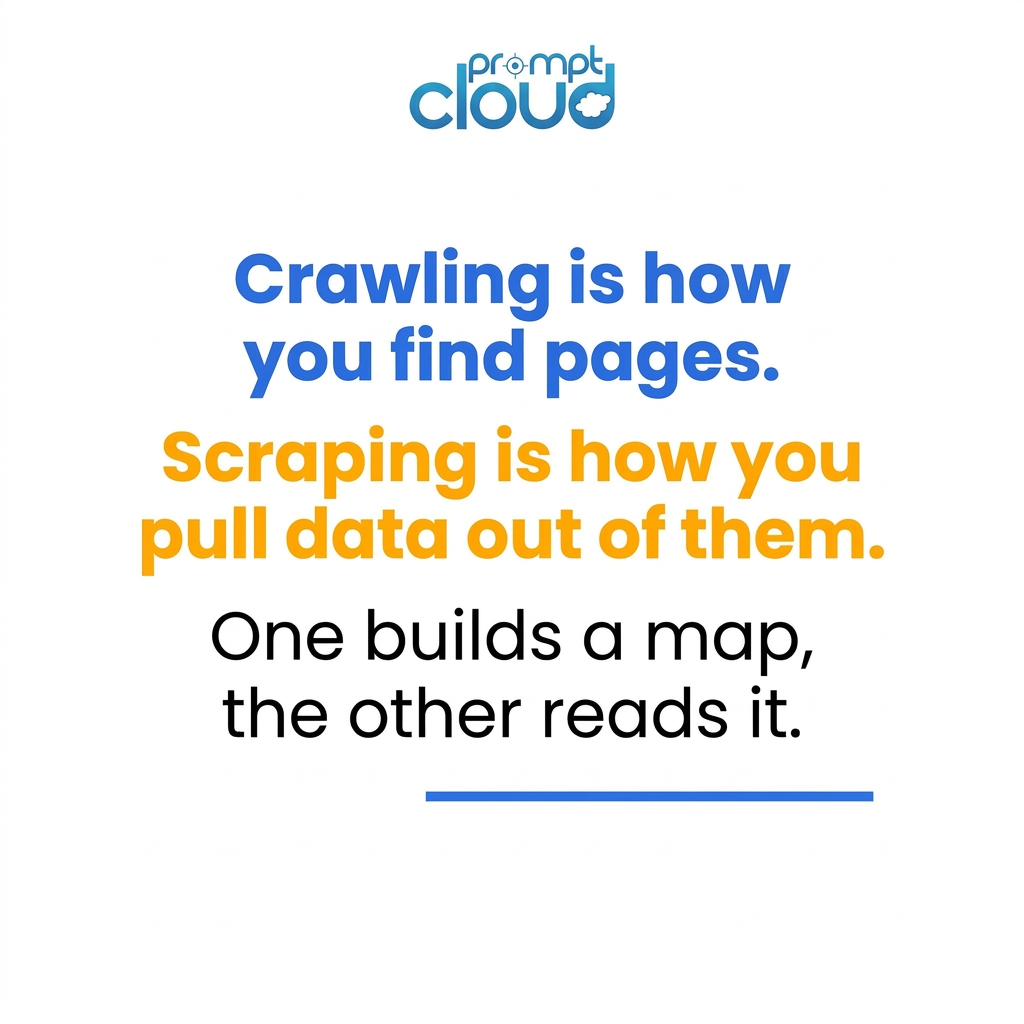
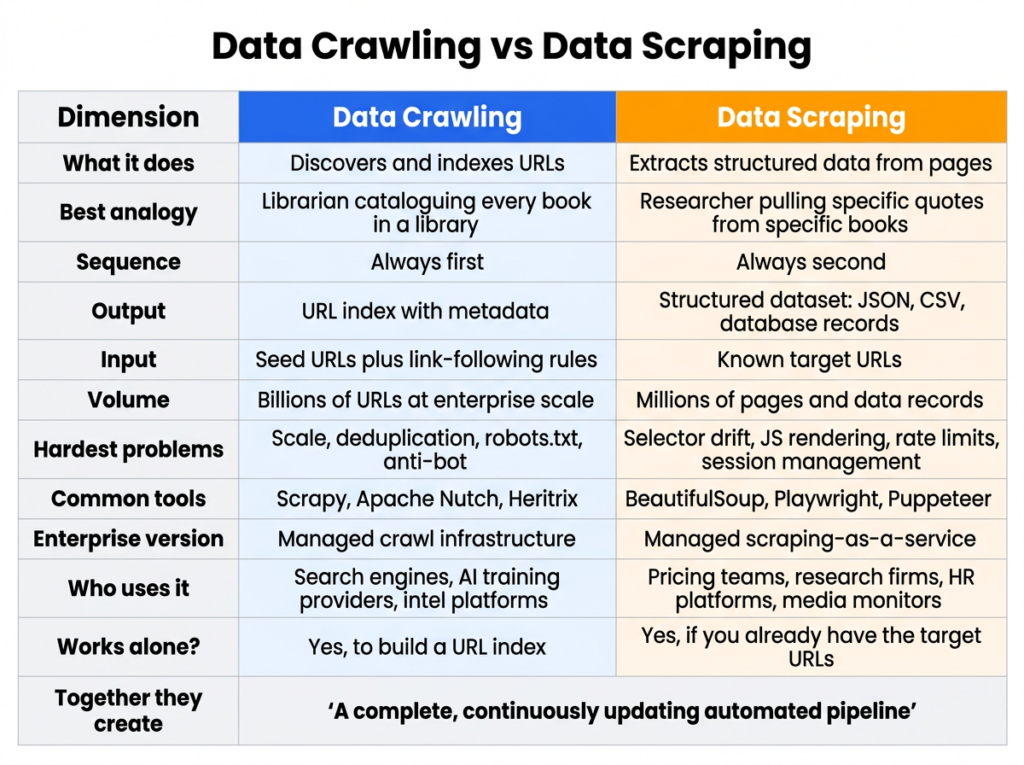
Crawling is how you find pages. Scraping is how you pull data out of them. One builds a map, the other reads it. And in most real data pipelines, you need both working together before anything useful comes out the other end.
The more important question for most engineering and data teams isn’t which one to use. It’s how to keep both running reliably without them eating half your engineering capacity just to stay alive.
What Is Data Crawling, Actually?
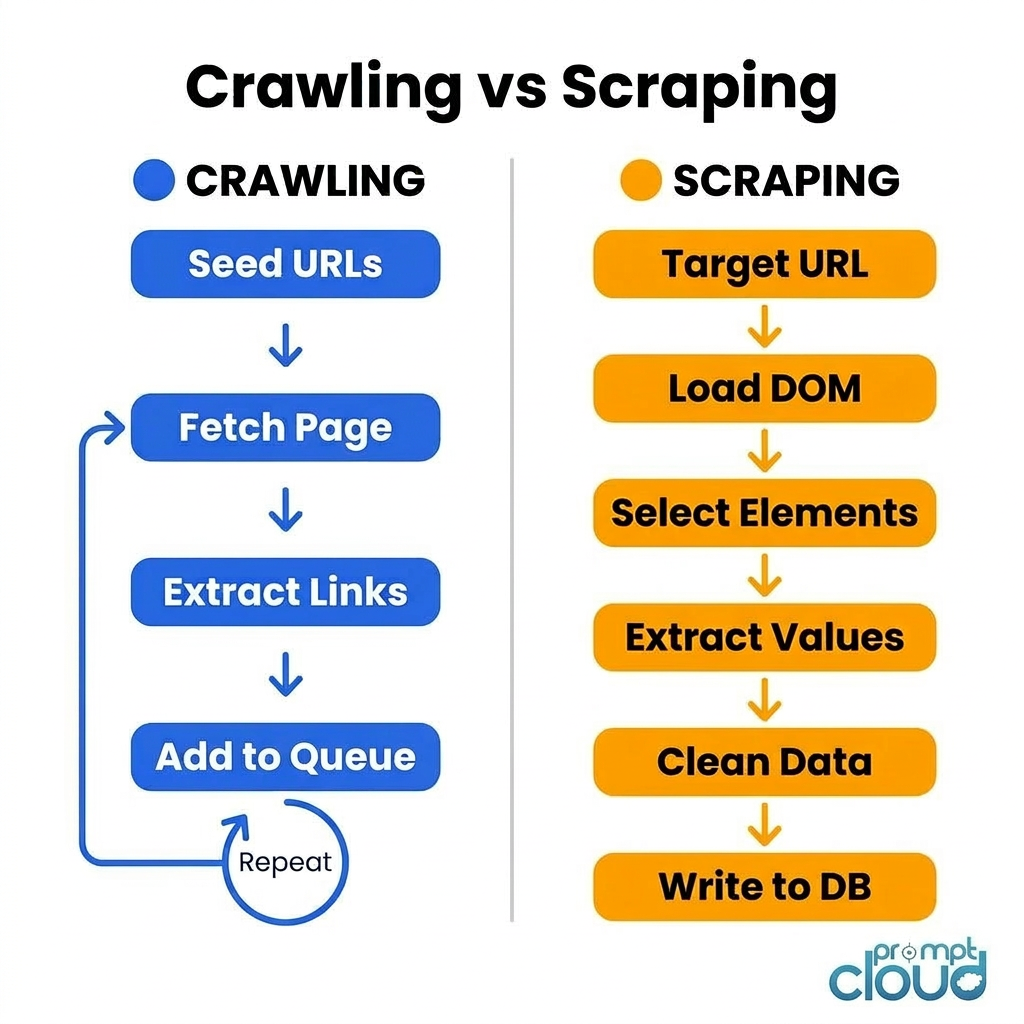
Data crawling (you’ll also see it called web crawling or spidering) is what happens when automated software systematically follows links across the web, building up an index of URLs as it goes.
Think of it the way Google works. Googlebot doesn’t read every page in detail when it visits. It shows up, notes what’s there, follows every link it finds, and moves on. The goal is coverage and discovery, not extraction.
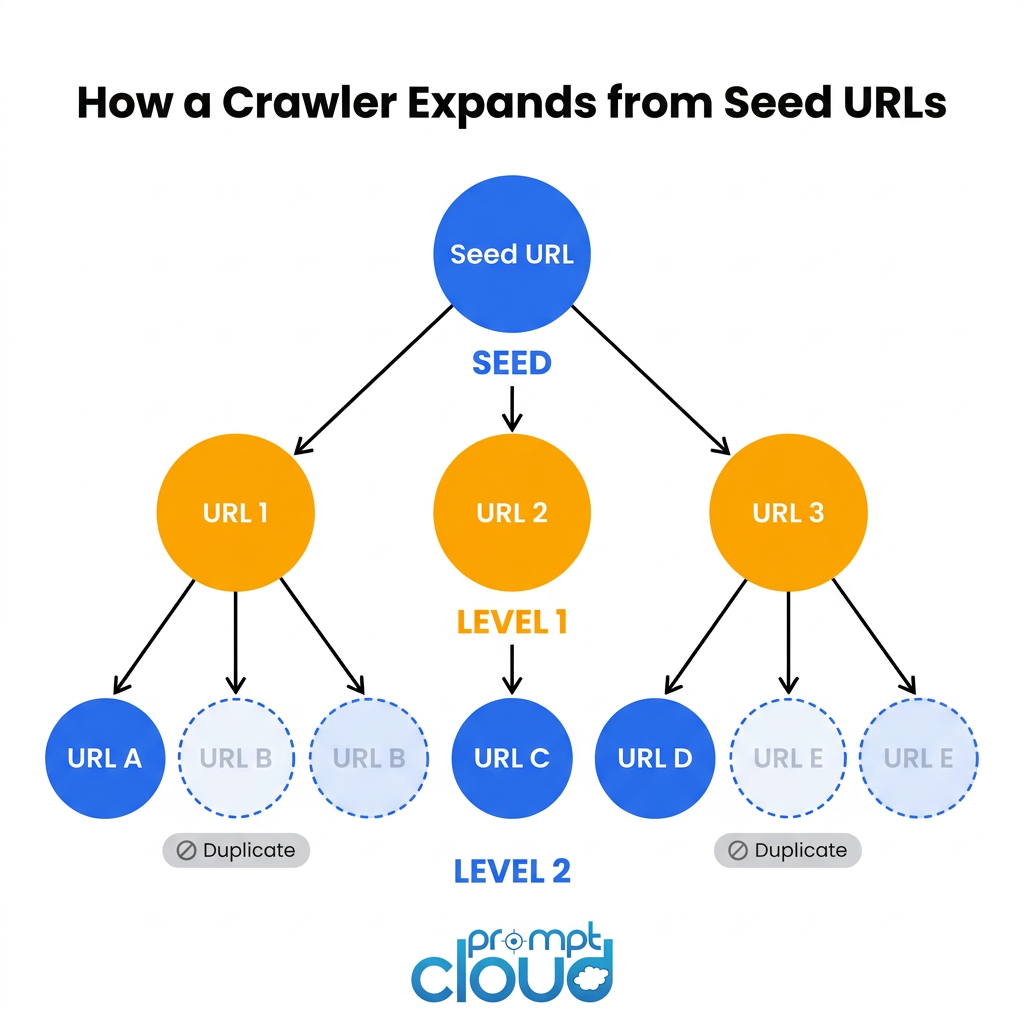
For enterprise teams, this plays out in a much smaller but structurally identical way. You point a crawler at a seed list of URLs, it starts following links, and over time you end up with a structured map of what exists, where it lives, and when it was last updated.
The output is an index: URLs, HTTP status codes, content hashes, crawl timestamps, link depth from the seed. No actual product data. No prices. No article text. Just the map.
What makes a production crawler different from a script you wrote on a Friday afternoon
Respecting the sites you crawl. Every production crawler has to handle robots.txt properly. That means reading Disallow rules, respecting Crawl-delay settings, and throttling requests so you’re not hammering a server with hundreds of requests per second. Skip this and you’ll find yourself IP-banned within hours, often permanently.
Deduplication at scale. Two URLs that look different can point to exactly the same page. A URL with query parameters sorted in a different order, a trailing slash added or removed, a session token tacked on by the server. A naive crawler treats these as separate pages and crawls them all. A production crawler normalises URLs and deduplicates before fetching. At scale this matters enormously. Deduplication can account for 40 to 60 percent of a crawler’s efficiency gains.
Distributed infrastructure. A single-threaded crawler maxes out at maybe a few thousand pages per day. Enterprise crawling across millions of URLs requires distributed workers, shared queue systems like Redis or Kafka, and coordinated frontier management across multiple machines running in parallel.
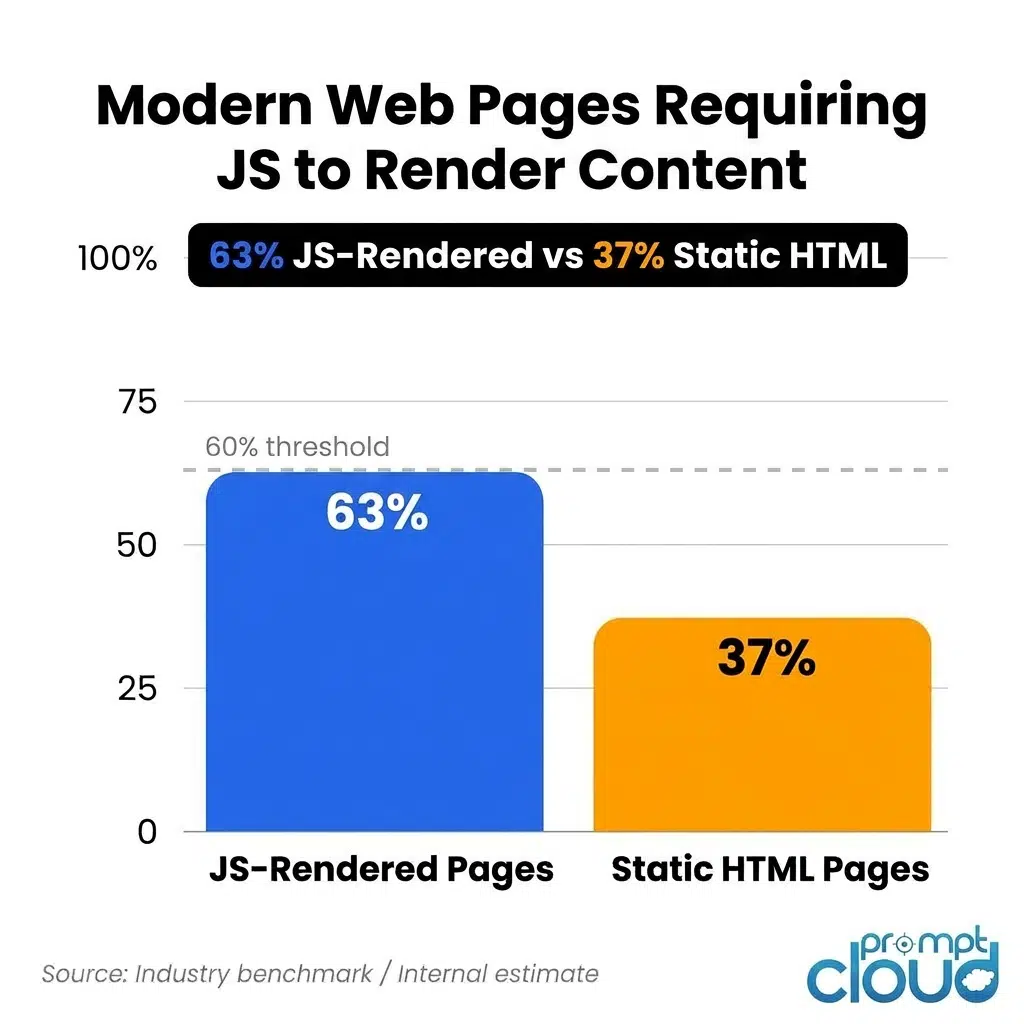
JavaScript rendering. More than 60 percent of modern pages render their actual content via JavaScript. If your crawler only fetches raw HTML, it’s missing most of what’s on the page. Handling this properly means running headless browser instances at scale, which is its own significant infrastructure problem.
Stop relying on fragile crawling and scraping setups for business-critical data.
Get structured, QA-verified datasets delivered with SLAs and human-in-the-loop validation.
• No contracts. • No credit card required. • No scraping infrastructure to maintain.
What Is Data Scraping, Actually?
Where crawling builds the map, scraping reads it and pulls out what you actually want.
A scraper visits a specific URL, loads the page (sometimes just the HTML, sometimes the fully rendered DOM), identifies the exact elements on the page that contain your target data, extracts those values, cleans them up, and writes them somewhere useful.
The output isn’t a list of URLs. It’s the actual data. Product prices. Article text. Job titles. Stock figures. Ratings. Whatever you’re after, in a structured format you can work with.
What actually breaks in production scrapers
Selector drift. A CSS selector like div.product-card > span.price works perfectly until the day the frontend team ships a redesign. Suddenly your scraper is returning blank fields. The dangerous version of this is when nobody notices for three weeks because there’s no monitoring in place to detect when expected fields stop returning data. By the time someone catches it, you’ve got three weeks of gaps in your dataset.
Getting blocked. Sites with real traffic invest seriously in blocking automated access. Staying unblocked at production scale requires rotating residential proxies, varying request timing, managing user agents, and handling CAPTCHAs when they appear. The open-source tools give you the scaffolding. The actual infrastructure to run it reliably is a separate problem entirely.
Pagination and session state. Scraping one URL is the easy case. Scraping 40,000 products spread across paginated category pages, behind faceted filters, with session management requirements is what production actually looks like. Most initial implementations don’t survive contact with a real catalogue.
Scheduling and freshness. A scraper that ran once gives you a snapshot. A pipeline that needs to deliver fresh pricing data every six hours is infrastructure. The scheduling logic, retry handling for failed fetches, backfill for missed windows, and alerting when something goes wrong often takes more engineering time than the scraper itself.
Crawling vs Scraping: The Side-by-Side
When You Can Skip the Crawler
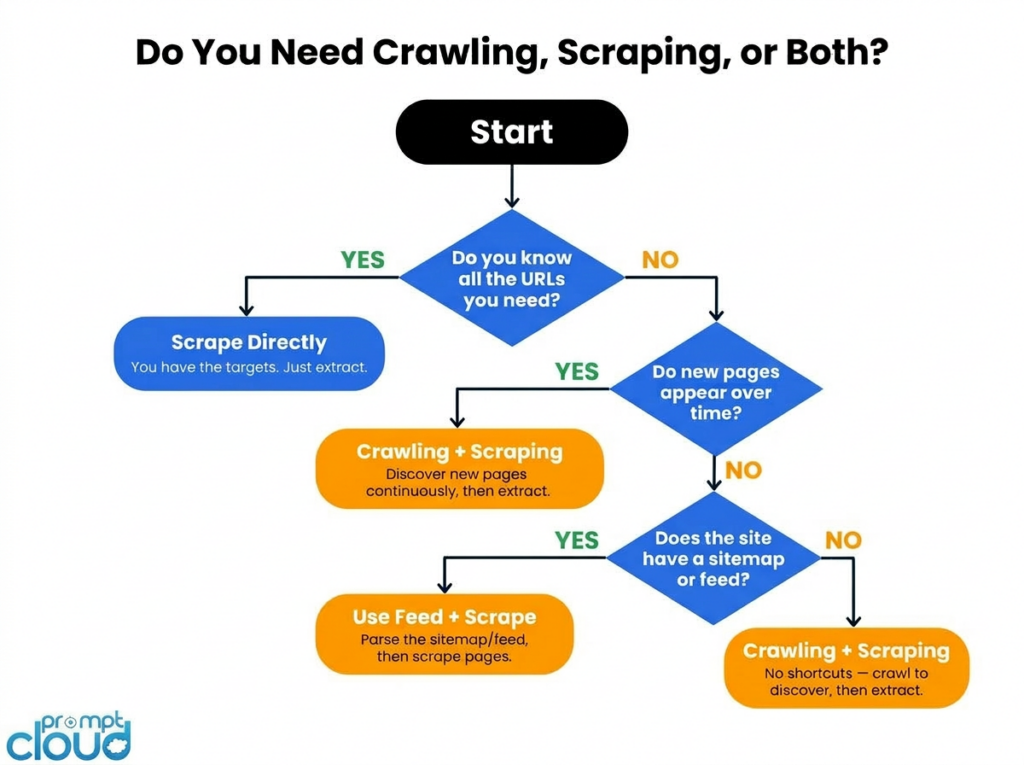
Not every data project needs a crawl step. There are real situations where going straight to scraping is the right call.
You already have all the URLs. If you’re monitoring 200 specific product pages on a competitor’s site, you know exactly where to go. There’s no discovery problem to solve. Set up a scraper, point it at your list, run it on a schedule.
The site gives you a feed. A lot of sources publish sitemaps, RSS feeds, or APIs that effectively do the crawl step for you. If the site is already telling you what pages exist and when they changed, consume that instead of building a crawler.
It’s a one-time job. Data migrations, research snapshots, and bounded competitive audits have a defined finish line. Crawling is infrastructure investment. If the task is scoped and fixed, scraping directly is faster and simpler.
Where this falls apart: The moment your target set becomes dynamic. New products get listed. New competitors appear. New job postings go live. A scraper running against a static URL list will never see any of them.
When You Need Both Working Together
Most serious data operations run crawling and scraping as a coordinated pipeline. The crawler feeds the scraper constantly. The scraper tells you what’s in the pages the crawler found. Neither works at full value without the other.
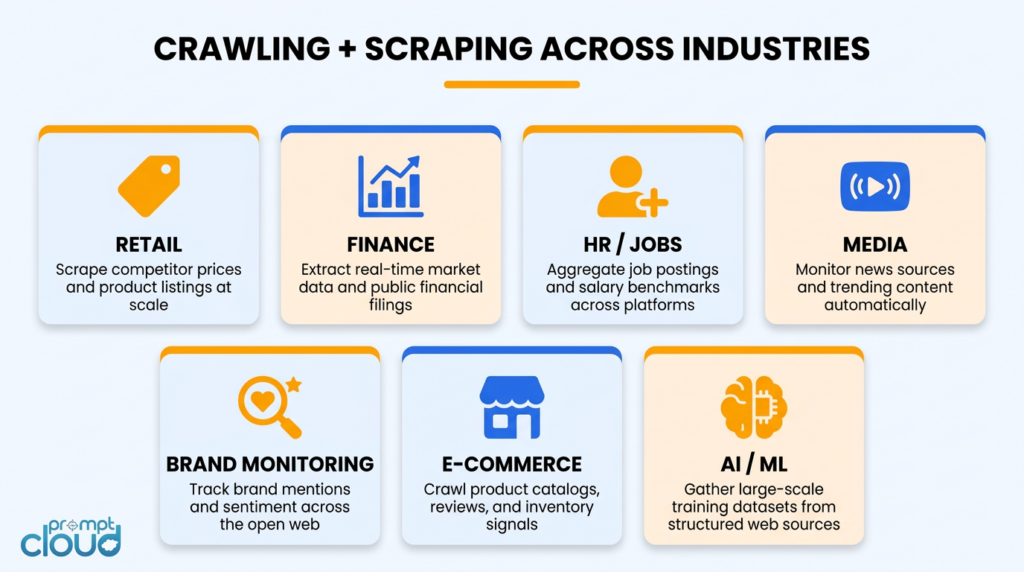
Here’s what that looks like across real use cases.
Competitor pricing at scale. Say you need to monitor pricing across 500 retailers, including new ones as they enter the market. A crawler watches each retailer’s sitemap and category pages, flagging new URLs as they appear. A scraper visits each new URL and pulls price, availability, and product data. Your coverage grows automatically as the market changes, without anyone manually updating a URL list.
Financial and market intelligence. In finance, timing is everything. Crawlers watch government databases, investor relations pages, and regulatory filing sites for new disclosures the moment they appear. Scrapers parse those documents and extract the structured data: company name, figures, dates, risk factors. Teams using this approach can act on information before it shows up in traditional data feeds.
Job market data. Building a jobs dataset across 50 or more job boards means dealing with hundreds of new postings every single day across each source. A crawler discovers new postings as they’re published. A scraper extracts the structured fields: title, company, location, salary range, required skills, posting date. Trying to do this without the crawl step means your dataset is perpetually behind.
Brand and sentiment monitoring. You can’t manually track what people are saying about your brand across thousands of review platforms, forums, and social channels. Crawlers continuously scan those sources for new mentions. Scrapers collect the actual content and feed it into sentiment analysis pipelines. The result is a near-real-time read on how perception is shifting, where complaints are clustering, and what’s going viral before your PR team would otherwise hear about it.
News and media monitoring. A media intelligence platform tracking 1,000 publications needs to know about new articles within minutes of publication. A crawler monitors homepages and section pages for new URLs. A scraper grabs headline, author, publish time, and full text. Together they deliver a structured feed of new content as it appears.
E-commerce catalogue tracking. Price monitoring is the obvious use case. But the harder problem is tracking catalogue changes: products added, variants discontinued, new SKUs launched. Only a crawler catches a product URL that didn’t exist in yesterday’s list. Scraping alone is blind to anything new.
AI training data. Large-scale AI projects need massive, diverse, continuously refreshed datasets. Crawlers handle the discovery side, pulling content from across the web. Scrapers extract and structure the samples that actually go into training. Let either one slip and either your dataset goes stale or your coverage narrows to what you already know about.
What Actually Changes When You Scale
This is the part most explainers skip, and it’s where real projects fail.
Scaling from a working prototype to a production pipeline isn’t just a matter of running more of the same thing. The problems genuinely change.
Anti-bot infrastructure becomes an arms race. At low volume, most sites ignore automated traffic. At 50,000 or more requests per day to a single domain, you’re no longer flying under the radar. Sites are actively running bot detection through Cloudflare, Akamai, and PerimeterX. Staying unblocked means rotating residential proxies, varying request timing and user agents, and handling behavioural fingerprinting. Each of those is a separate vendor relationship or engineering project.
Running headless browsers at scale is a different problem. Playwright on your laptop handles 100 pages a day without breaking a sweat. At 500,000 pages a day, you’re operating a browser farm: dozens of parallel Chrome instances, a render queue, memory management, and container orchestration. Teams that prototype with Playwright and then try to scale it almost always underestimate what that transition costs.
Silent failures are the worst kind. A scraper that returns empty data without alerting anyone is more dangerous than one that crashes. At scale, site redesigns that break your selectors happen constantly across a large target set. Without automated monitoring comparing field completeness against recent baselines, a pipeline can silently degrade for weeks. Building that monitoring layer typically takes 30 to 50 percent of the total engineering effort in a mature scraping operation.
Crawl rate is not a set-and-forget configuration. The right request rate for a given domain depends on how that server is behaving right now, not how it behaved when you first set it up. Production crawlers tune per-domain rates dynamically, reading response times and Retry-After headers. This is ongoing operational work.
Deduplication isn’t just about efficiency. If you’re revisiting 10 million URLs per month and 80 percent of them haven’t changed, you’re paying to re-fetch unchanged content over and over. Production crawlers use content hashing to detect unchanged pages and skip the scrape step. Without this, costs scale with URL count rather than actual data change.
Freshness SLAs are harder than they sound. Saying “we scrape it daily” and actually guaranteeing data arrives fresh every day before 6am are two different things. A real SLA means scheduling, retry logic for failed fetches, backfill logic for missed windows, and alerting that fires before your client notices a problem rather than after they call to ask where their data is.
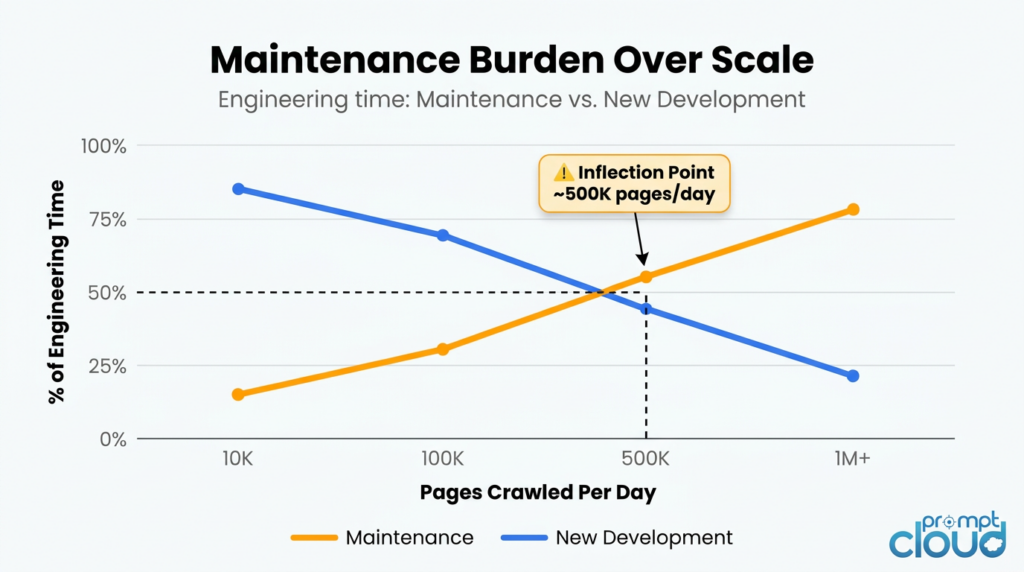
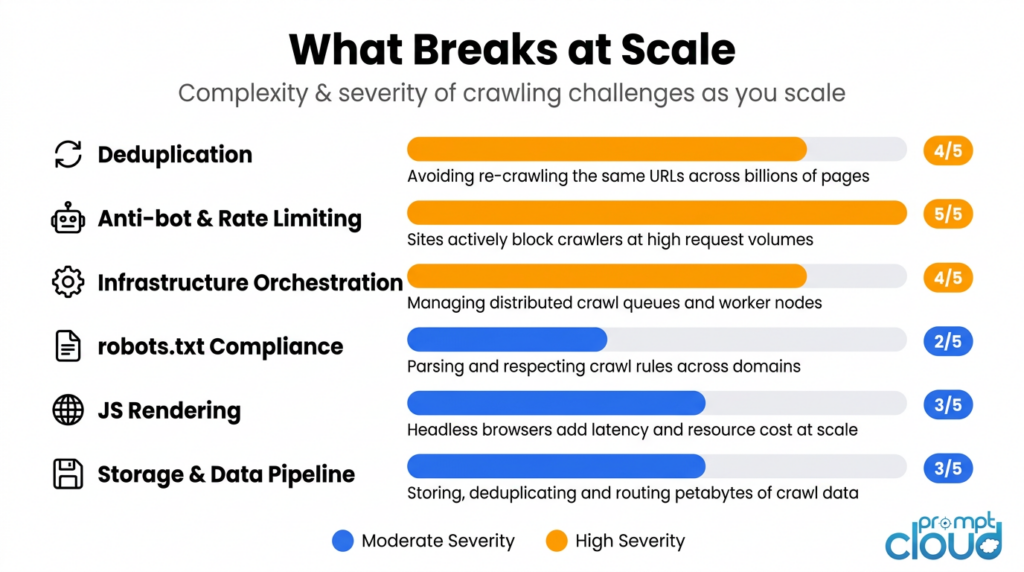
The inflection point: Most in-house data teams hit a threshold where 30 to 40 percent of engineering capacity is keeping the pipeline running rather than improving it. At that point, the build-vs-buy calculation shifts decisively in favour of managed infrastructure.
What AI Has Changed About This in 2025 and 2026
The crawling landscape looks meaningfully different today than it did three years ago, and a lot of internal infrastructure was built before these shifts happened.
The biggest change is that AI companies have become the largest buyers of crawling infrastructure, and publishers know it. In response, major content sites have substantially tightened their bot defences. Cloudflare, Akamai, and DataDome have all shipped specific countermeasures aimed at AI crawlers. If your enterprise crawler was running fine in 2022 and is now hitting higher block rates, that’s likely why. The baseline hostility of the web toward automated access has gone up, not because your setup changed but because the environment did.
Robots.txt has also evolved. Sites are now adding Disallow rules specifically for known AI crawlers: GPTBot, ClaudeBot, CCBot, PerplexityBot. Enterprise teams need explicit internal policies for how to handle these directives, especially where your use case touches on AI training data, news content, or product catalogues.
There’s also a subtler strategic consideration. As AI Overviews and generative search increasingly answer queries without sending users to source pages, the value of publicly accessible web content is shifting. Data that can be summarised by an AI has less unique value in a pipeline. Data that sits behind logins, requires session management to access, or isn’t crawlable by Google has become more defensible. That’s worth factoring in when you’re deciding which sources to invest in monitoring.
And freshness expectations have risen across the board. Competitive intelligence that was acceptable as a weekly report three years ago is now expected as a live dashboard. Infrastructure built before that expectation shift may not be architected for it.
The Ethics and Legal Side You Can’t Ignore
Compliance isn’t a nice-to-have for enterprise data teams. It’s a hard operational constraint, and getting it wrong has real consequences: IP blocks, legal exposure, and reputational damage with the very sites you depend on for data.
Start with robots.txt and terms of service. The robots.txt file is a site’s way of telling crawlers what’s off limits. Ignoring it isn’t just impolite; in some jurisdictions it creates genuine legal exposure under computer access statutes. A site’s Terms of Service often goes further, defining what automated access is permitted and under what conditions. Enterprise crawling programmes typically require legal review of the ToS for each target domain before crawling begins.
Don’t hammer servers. Sending hundreds of requests per second to a smaller site can degrade its performance for real users. Beyond being harmful, aggressive crawling creates liability. Production crawlers implement per-domain rate limits that respond dynamically to what the server is signalling, and back off automatically when they detect strain.
Handle personal data carefully. Even when pages are publicly accessible, scraped data can contain names, email addresses, employment information, and other personally identifiable data. GDPR in Europe, CCPA in California, and equivalent legislation elsewhere impose specific requirements on how that data can be collected, stored, and used. The cleaner approach is to anonymise or exclude PII at the extraction stage rather than collecting it and figuring out what to do with it later.
Build pipelines you can audit. Enterprise data programmes need to encrypt data in transit and at rest, maintain access logs, and support audit trails that trace how any given dataset was produced. When your legal or compliance team asks how a particular dataset was collected, “we ran a script” is not a sufficient answer.
Laws differ by region and keep changing. A data collection practice that’s compliant in the United States may not be in Germany, and what’s acceptable in 2024 may not be in 2026. Keeping track of jurisdictional changes is ongoing work. This is one reason some enterprise teams move to managed providers: regulatory tracking and compliance enforcement become someone else’s operational responsibility.
Read more about how PromptCloud approaches ethical data collection
Frequently Asked Questions
What is the difference between data scraping and data crawling?
Crawling is about discovery. A crawler follows links across websites and builds an index of what URLs exist and where. Scraping is about extraction. A scraper visits specific pages and pulls out the data you actually want. Most enterprise pipelines run them in sequence: crawling first to find the pages, scraping second to read them.
Is web scraping the same as web crawling?
Not technically, though people use the terms interchangeably all the time. If someone tells you they “built a web scraper,” they probably built something that does both. The precise distinction is: crawling discovers URLs, scraping extracts content from them.
What is a data crawler?
A data crawler is software that systematically browses the web by following links, building up a structured index of pages as it goes. Googlebot is the most famous example. Enterprise crawlers do the same thing but at a smaller scale focused on specific domains or categories relevant to a business.
Which is faster, crawling or scraping?
Crawling tends to have higher raw throughput because it’s only parsing links, not extracting structured data. Scraping is slower per page because it has to identify specific elements, pull values, validate them, and write them to storage. In practice, they run in parallel: crawling continuously in the background, scraping on a schedule against the discovered URL list.
Do I need to crawl before I can scrape?
Not always. If you have a complete, stable list of target URLs, you can scrape directly. Crawling becomes necessary when you need to discover pages that don’t exist in your list yet: new product listings, new job postings, new articles as they’re published.
What tools are used for web crawling?
Common open-source options include Scrapy, Apache Nutch, and Heritrix. At enterprise scale, most teams either build custom distributed infrastructure or move to a managed crawling service that handles scale, anti-bot evasion, and SLA compliance without internal maintenance overhead.
Is web crawling legal?
Crawling publicly accessible data is generally legal, but it’s subject to each site’s robots.txt directives, terms of service, and the applicable laws in your jurisdiction. Computer fraud and access statutes vary significantly across countries. Enterprise data programmes typically require legal review before crawling any new domain, particularly for financial data, personal data, or content on restricted platforms.
What is the difference between a web crawler and a search engine?
A search engine is a product built on top of a web crawler. The crawler provides the URL index. The search engine adds ranking algorithms, a query interface, and a front-end. Enterprise teams use crawlers to build their own internal data products, not public search engines.
Why does deduplication matter in crawling?
Without deduplication, a crawler visits the same pages repeatedly, either because the same URL appears in multiple link paths or because slight URL variations point to the same content. At scale, this wastes significant compute and inflates your dataset with redundant data. Good crawlers normalise URLs and use content hashing to skip pages that haven’t changed since the last crawl.
How PromptCloud Handles This
PromptCloud’s model is straightforward. You tell us what data you need, where it lives, how fresh it needs to be, and what format to deliver it in. We handle everything in between: the crawl infrastructure, JavaScript rendering, anti-bot evasion, selector monitoring, freshness scheduling, and SLA compliance.
You don’t maintain the pipeline. You just get the data.
The two situations where clients typically reach out are: an internal scraping setup that started as a small project and has grown to consume 30 to 40 percent of an engineering team’s time just to keep running, or a new data product initiative where building the infrastructure from scratch would take six to twelve months before any data arrives.
We work across retail and e-commerce (pricing intelligence and catalogue monitoring), HR and recruitment (job posting datasets and labour market intelligence), financial services (public financial data aggregation), and media (news content feeds and monitoring).
If you want to talk through what this looks like for your specific use case, most scoping conversations take about 30 minutes.
Book a scoping call | See how our managed web scraping works
Related Reading
- Ethical Data Collection: How PromptCloud Approaches Compliance
- Guide to Mobile App Scraping at Enterprise Scale
- How Does a Web Crawler Work
- Is Web Scraping Legal in the US? A Complete Guide
- Why Enterprise Web Scrapers Fail in Production (coming soon)
- Build vs Buy: The Web Scraping Infrastructure Decision (coming soon)